About this app
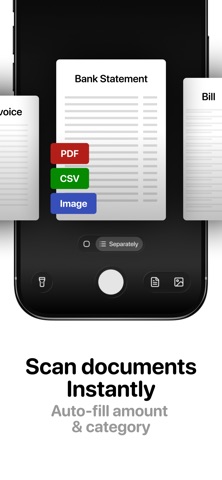
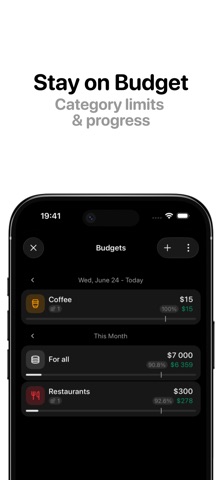
Track money at the speed of speech. Qalta is a fast expense tracker for people who hate typing. Say a purchase out loud, scan a receipt, or add it manually — in seconds, not minutes. WHY QALTA? • Voice logging — Say "Spent $15 on coffee" or "Netflix $10 every month." Qalta fills in the amount, category, and recurring schedule for you. • Receipt scanning — Snap a photo of a receipt, bill, or bank statement. Qalta extracts the details so you don't have to. • Multi-currency accounts — Create accounts in any currency. Live exchange rates help you see your total balance at a glance — ideal for travel and remote work. • Built for iPhone — Home Screen widget, Siri Shortcuts, Back Tap, Action Button, and Apple Pay automations let you log spending without opening the app. MORE YOU'LL USE EVERY DAY • Budgets — Set limits by category or account and track what's left. • Insights — Spending trends, subscription totals, and patterns that are easy to miss in a spreadsheet. • Analytics — See where your money goes with clear category breakdowns. • Recurring transactions — Subscriptions and bills, set manually or by voice. • Search & filters — Find any transaction in seconds. • CSV export — Your data, your spreadsheet. • Privacy first — Financial data stays on your device. Optional iCloud backup. No ads. Start with the free plan. Upgrade to Qalta Pro for unlimited transactions when you need it. Terms of Use (EULA): https://www.apple.com/legal/internet-services/itunes/dev/stdeula/ Privacy Policy: https://tokkozhin.github.io/qalta.app/privacy-policy.html
Latest release
What’s New
• Account groups — organize accounts by purpose and switch between them quickly • New analytics charts: stacked bars and cashflow, plus drill-down into subcategories • Monthly budgets can start on any day, and you can open the matching transactions • CSV import now understands subcategories • Added Kazakh language • New transactions remember your last account; swipe to change the date • Fixes for blur on iOS 26, the amount keyboard, and overall stability
Audience growth
Ratings growth
Baseline captured. Growth appears after the crawler observes a changed rating count.
Momentum comes from crawler snapshots for the tracked storefront. “Viral growth signal” means unusually fast recent rating gains; it is an indicator, not download data.
Price tracking
Price intelligence
First snapshot captured. The trend line starts after the next crawler price observation.
- First observed Aug 19, 2026 · 5:14 AM Free
Screenshots