About this app
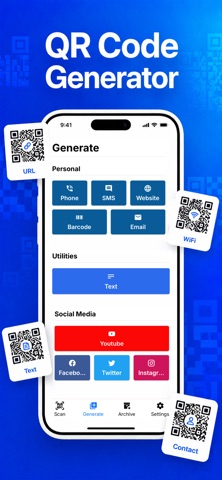
With this QR scanner app you can scan QR codes and barcodes in a few seconds, as well as create custom and personalized QR codes or barcodes. QR Tech is a useful scanner and QR & barcode creator app for all the experiences you want to have with QR codes, easy and fast to use. Moreover, it is very easy to scan and export QR codes in bulk with CSV. How QR Tech Works? QR Tech automatically detects QR codes and barcodes as soon as the camera is turned on. Simply point your camera at the QR code or barcode. Features: - Automatically detects and scans QR codes and barcodes. - Creates personalized and custom QR codes. - Created or scanned QR codes and barcodes are archived in the History tab. - Generated QR codes can be shared with others as photos or text. - QR Tech does not require an internet connection to scan or generate QR codes. - Your QR codes are downloaded to your phone as photos or text. - Exports scan files as CSV. - Scan photos containing QR codes by easy import. What Can You Do with QR Tech? Scan QR or Barcode: Point your camera at QR codes or barcodes and just wait a second for automatic detection. Create QR: Create QR codes with one or more information in a few clicks. Share QR: Share the QR codes you have created with other people as photos or text. Store QR Codes: Retrieve the QR codes you have scanned or created from the archive. QR Tech recognizes all QR codes and barcodes and creates personalized and custom QR codes. You can store your QR codes in the archive and you can easily share them with your friends & colleagues. You can also export scanned codes as CSV. Which QR Codes Do QR Tech Supports? Web Page Links (URL) Contact Email SMS Social Media Accounts (Facebook, Twitter, YouTube, Instagram) Which Barcodes Do QR Tech Supports? Code 39 Code 93 Code 128 Codabar EAN-8 EAN-13 UPC-A UPC-E Interleaved 2 of 5 (ITF) ITF-14 QRCode DataMatrix PDF417 GS1 DataBar GS1 Composite Subscription Terms - Payments will be charged to your iTunes account with your purchase confirmation. - After purchase, you can manage your subscriptions and make changes in your account. - Subscription will be renewed at the same price and package from your iTunes account unless auto-renewal is turned off at least 24 hours before the end of the current period. - If you cancel your subscription, your subscription will continue for the paid period until the end of the period. - During the free period of a subscription, your subscription can be canceled through your iTunes account and you will not be charged. - Subscriptions during the free trial period will renew to a paid subscription at the end of the trial. For all inquiries, please contact support@vunyo.com. Privacy Policy: https://vunyo.com/apps/qrtech/privacy Terms of Service: https://vunyo.com/apps/qrtech/terms
Latest release
What’s New
Bug fixes and stability improvements
Audience growth
Ratings growth
Baseline captured. Growth appears after the crawler observes a changed rating count.
Momentum comes from crawler snapshots for the tracked storefront. “Viral growth signal” means unusually fast recent rating gains; it is an indicator, not download data.
Price tracking
Price intelligence
First snapshot captured. The trend line starts after the next crawler price observation.
- First observed Aug 18, 2026 · 10:43 AM Free
Screenshots