About this app
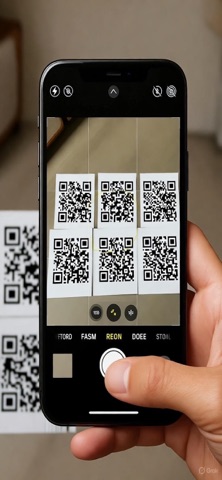
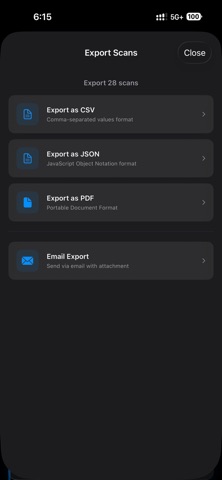
The Ultimate QR Code Scanner & Manager Scan, save, and organize QR codes effortlessly with the most powerful QR code scanner app for iPhone and iPad. KEY FEATURES MULTIPLE SCAN MODES • Quick Scan: Instantly scan single QR codes with one tap • Batch Scan: Scan multiple QR codes in one session - perfect for events, menus, and business cards • Photo Import: Upload QR codes from your photo library - no need to rescan! SMART ORGANIZATION • Search: Quickly find any scanned QR code by content or URL • Smart Filters: Organize by type - URLs, Text, WiFi networks, Contacts, or view All • Chronological History: All scans saved with timestamps POWERFUL EXPORT OPTIONS (Pro) • Export to CSV for spreadsheets • Export to JSON for developers • Export to PDF for reports • Email exports directly from the app • Share individual or multiple QR codes BEAUTIFUL & INTUITIVE • Modern, clean interface designed for iOS • Smooth animations and transitions • Dark mode support • iPad optimized with split view PRIVACY FIRST • All data stored locally on your device • No cloud sync - your scans stay private • No ads or tracking PERFECT FOR: • Business professionals managing multiple QR codes • Event organizers scanning tickets and badges • Students organizing research materials • Anyone who needs to scan and save QR codes regularly FREE TIER: • 10 free scans to try all features • Full access to scanning and organization tools PRO FEATURES: • Unlimited scans • Export to CSV, JSON, and PDF • Email export functionality • Priority support Download now and experience the best QR code scanning solution for iOS!
Latest release
What’s New
Our biggest update yet! We’ve rebuilt the app from the ground up to provide a professional-grade scanning experience: • New Batch Engine: Re-engineered camera logic for faster, more reliable concurrent detection. • Pro PDF Reports: Now includes live-generated QR images for every entry—perfect for inventory and inventory management. • Bulk Actions: A new multi-select toolbar allows you to delete or export specific batches of scans with a single tap. • Long-Press to Edit: Easily enter edit mode by long-pressing any scan card. • Summary Dashboard: A new home for your scanning stats, showing total scans and today's activity. • Camera Refinement: Added pinch-to-zoom, tap-to-focus, and low-light boost for "Pro" level control. • Performance: Significantly reduced battery usage and improved app responsiveness.
Audience growth
Ratings growth
Baseline captured. Growth appears after the crawler observes a changed rating count.
Momentum comes from crawler snapshots for the tracked storefront. “Viral growth signal” means unusually fast recent rating gains; it is an indicator, not download data.
Price tracking
Price intelligence
First snapshot captured. The trend line starts after the next crawler price observation.
- First observed Aug 31, 2026 · 6:09 AM Free
Screenshots