About this app
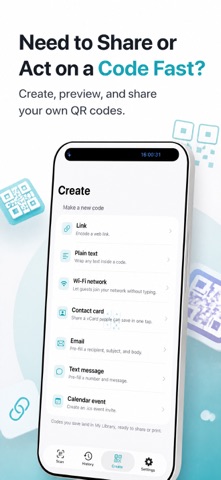
Scan codes with less guesswork and more confidence. Open links only when you choose, spot suspicious QR code destinations before you tap, and keep every scan in one searchable place. In The App - Scan QR code and barcode formats from the full-screen camera with pinch to zoom, animated highlights, and a torch toggle for dark spaces. - Check link safety with Quishing Shield before opening a URL, with clear results like Looks safe, Be careful, or Dangerous — do not open. - See a plain-English summary for scanned links, plus details like redirect hops, domain age when available, and why a warning was triggered. - Open a scanned website manually with Open in Browser, or share the link instead. Links never open on their own. - Join networks faster by scanning a Wi-Fi code, viewing the network name and type, then using Copy Password when your iPhone asks for it. - Save a contact card from a scanned code with Save Contact, or start an email, text message, or call from the matching result sheet. - Add a scanned event to Calendar, search the web for a retail barcode or book code, and copy or share plain text. - Find old scans in History with search, payload filters, safety filters, tags, swipe to delete, and multi-select delete. - Make your own QR code for a link, plain text, Wi-Fi network, contact card, email, SMS, or calendar event with a live preview. - Keep created codes in My Library, then open, share, or delete them later. Perfect When That coffee shop Wi-Fi QR is taped to the counter and you just want to copy the password and get online. A parking meter sticker looks off, so you scan the QR code and read the warning before paying. You need a contact QR from a conference badge saved in one tap. You remember scanning a useful link months ago, but only part of the text comes to mind, so you search your history by value or tag. You want to send someone a Wi-Fi QR, so you build it in the Create tab and share the saved image. Why It Works QR Code Reader Scan Barcode helps people scan, check, save, and create QR codes without extra steps. It combines a quick QR scanner, barcode reader, QR maker, and searchable history in one place. The app stands out by keeping the most important checks on your phone and putting you in control of every action. Quishing Shield reviews risky link patterns before you open a page, and the browser button is always a manual tap. Helpful shortcuts can jump straight to scan, reopen your latest result, find saved Wi-Fi scans, or start a link QR code. Paid Features Upgrade for more ways to work with your scans: turn on a cloud threat feed for broader link checks, scan from more photos in a batch, export filtered history, add branded code styles, and use unlimited photo scanning. permission is only requested when you tap Save Contact. If you scan QR codes often, want a barcode scanner with memory, or need a QR code generator you can trust, give QR Code Reader Scan Barcode a try today. Terms of Use (EULA) - http://www.apple.com/legal/itunes/appstore/dev/stdeula
Latest release
What’s New
Bug fixes and enhancements
Audience growth
Ratings growth
Momentum comes from crawler snapshots for the tracked storefront. “Viral growth signal” means unusually fast recent rating gains; it is an indicator, not download data.
Price tracking
Price intelligence
- First observed Aug 11, 2026 · 7:48 AM Free
Screenshots