About this app
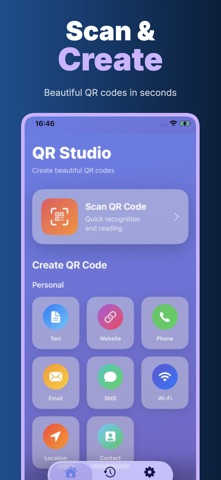
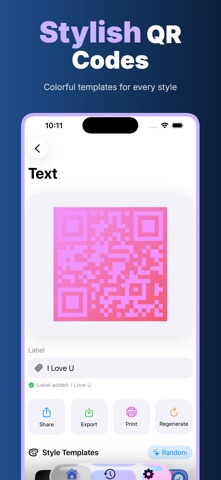
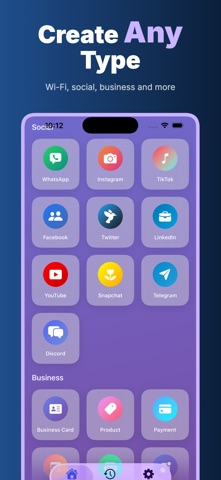
QRForge is a fast QR code generator and scanner for iPhone, made for the QR codes people use every day: websites, plain text, notes, Wi-Fi details, contacts, phone numbers, email addresses, SMS messages, locations, app links, labels, business cards, classroom materials, event signs, receipts and personal reminders. Open the app, choose what you want to create, enter the content, preview the QR code instantly and share it when it is ready. The workflow is simple enough for quick personal use and flexible enough for work. Scan a QR code with the camera, save generated or scanned items to history, mark important codes as favorites, add a readable label, regenerate a code after editing, export it as PNG or PDF, print it, or send it through the iOS share sheet. If you create the same kind of code often, history and favorites keep it close without making you rebuild everything from scratch. Create the QR codes people actually need. Make a website QR for a menu, poster or flyer. Turn Wi-Fi network details into a code guests can scan. Save contact information as a shareable card. Convert a phone number, email address, text note, SMS message or location into a scannable code. QRForge detects common content types and keeps the editor focused, so you can move from idea to finished QR code without a long setup flow. Design matters because a QR code often appears in the real world. QRForge includes clean style templates, classic black and white output, colorful designs, rounded modules, gradient looks, random style options and optional logo support. You can keep a code minimal for office use, make it more visible for a shop counter, or create something more polished for packaging, invitations and social posts. The goal is practical design: the code should look good and stay easy to scan. Scanning is built for the same everyday pace. Use the camera to read a code, adjust scan sensitivity when needed, and let auto-save keep useful scans in history. Generated, scanned and favorite codes live together in a clean library, so you can find a recent Wi-Fi code, reuse a printed label, or open a saved website code without searching through screenshots. QRForge is built around five privacy promises: Offline, No Login, Privacy First, On Device, No Cloud Upload. The core QR creation and reading experience is designed to work without a QRForge account. You do not need to register, sign in, sync a profile or hand over content just to make a code. Your QR text, Wi-Fi details, contact cards, labels, scan history and generated images are handled on your iPhone. Offline: create and manage QR codes even when you do not want to depend on a web service. No Login: open the app and use the main tools without creating an account. Privacy First: the product keeps the flow focused on your content instead of tracking, social features or remote dashboards. On Device: QR generation, previews, scanning, local history, favorites and settings are handled on the device. No Cloud Upload: QRForge does not upload your QR content, scan results, Wi-Fi passwords, contact details, labels or generated codes to a QRForge cloud. This local-first approach is especially useful for QR codes that contain private or operational information: home Wi-Fi, office networks, internal links, event check-in pages, personal contact cards, classroom notes, customer service emails or temporary directions. A QR tool should not turn every small code into another online account or cloud folder. QRForge keeps the boundary clear: create it, scan it, save it locally, export it when you choose. Privacy Policy https://5gotogo.github.io/QRStudio-privacy/privacy-policy.html Terms of Use https://www.apple.com/legal/internet-services/itunes/dev/stdeula/
Latest release
What’s New
Bug fixes and performance improvements.
Audience growth
Ratings growth
Baseline captured. Growth appears after the crawler observes a changed rating count.
Momentum comes from crawler snapshots for the tracked storefront. “Viral growth signal” means unusually fast recent rating gains; it is an indicator, not download data.
Price tracking
Price intelligence
First snapshot captured. The trend line starts after the next crawler price observation.
- First observed Aug 11, 2026 · 8:03 AM Free
Screenshots