About this app
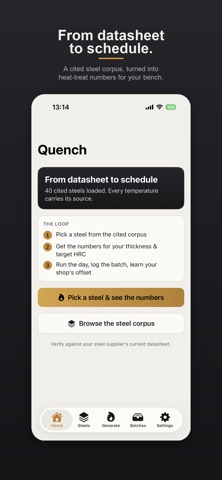
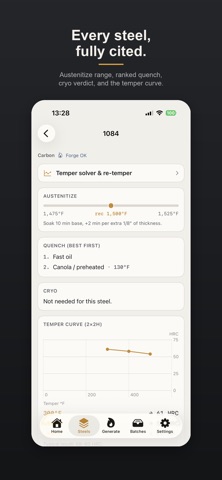
Quench turns "what's the heat treat for this steel?" into a complete, equipment-aware schedule. Pick a steel from a cited corpus, give it your blade thickness and target hardness, and tell Quench the gear you own. It builds the whole plan: preheat, austenitize temperature and a soak scaled to your stock, the best quench for the equipment you have, cryo when the steel calls for it, and temper temperatures solved from the curve to land your target HRC. Every number is tappable to its "why" and its source. FROM DATASHEET TO SCHEDULE - Each steel is a structured record from manufacturer datasheets, carrying its source list and last-verified date. - Soak time scales to your blade thickness, not to an industrial section. - The quench stage picks the best option you own - and honestly blocks with alternatives when your gear can't do a steel justice. - Stainless in forge mode is refused, with the reason. A cryo-required steel will not render a schedule without its cryo stage. HIT THE NUMBER - Temper temperatures solved from the curve for your target hardness, with the reachable range. - An honest re-temper tool: too hard computes a hotter cycle; too soft says plainly that a re-heat-treat is required, because tempering cannot add hardness. RUN THE DAY - HT Session Mode runs a schedule stage by stage with countdown timers and a Live Activity showing the current stage and next action. - A brief per-session safety note; interruption-proof at the kiln. CLOSE THE LOOP - Every run is logged with its schedule, stage actuals, quench used, measured HRC, outcome tags, and photos. - One tap re-runs a proven batch exactly. - Log your measured hardness and Quench learns your shop's offset per steel, then compensates the next schedule. FREE - Six starter steels with complete schedules: 1084, 1095, 80CrV2, 5160, O1, AEB-L. - HT Session Mode and the Live Activity. - Five batch logs, your shop profile, and the safety and sourcing surfaces. PRO - The full steel corpus - 40 cited steels at launch (growing), each with a complete thickness-scaled, equipment-aware schedule. - Temper solver - solve temper temps for your target HRC, plus an honest re-temper tool (too soft means re-heat-treat, never a hotter guess). - Kiln program export - any schedule as a ramp/setpoint/hold segment table, shared as text or PDF. - Personal HRC calibration - your measured batches teach Quench your shop's per-steel offset. - Custom steels - author your own steel records in the same schema, badged as your data. - Unlimited batch logs, beyond the free tier's five. - Side-by-side comparison of two steels' full process records. - Home and Lock Screen widgets for the session countdown and last-batch re-run. - Batch share cards - blade photo, steel, schedule summary, and measured HRC. HOW THE NUMBERS ARE MADE Quench is rule-based. Every temperature, time, medium, and temper curve is compiled from manufacturer datasheets and public references as facts, cited per steel. Quench schedules - it never certifies or guarantees an outcome. Always verify against your steel supplier's current datasheet. YOUR SHOP, YOUR RECORDS Your steels, schedules, and batches live on your iPhone. There is no account and nothing to sign up for. Quench makes no network calls beyond asking Apple whether your Pro purchase is active. Designed exclusively for iPhone. SUBSCRIPTION & PURCHASE - Lifetime: a one-time purchase that unlocks every Pro feature - the corpus grows, your price doesn't. - Yearly: auto-renewing, with a 7-day free trial for new subscribers. - Monthly: auto-renewing. Payment is charged to your Apple ID. Auto-renewing subscriptions renew unless canceled at least 24 hours before the period ends; manage or cancel in your Apple ID settings. An unused free-trial portion is forfeited when you buy Pro. Privacy Policy: https://app-legal-pages.vercel.app/quench/privacy Terms of Service: https://app-legal-pages.vercel.app/quench/terms
Audience growth
Ratings growth
Baseline captured. Growth appears after the crawler observes a changed rating count.
Momentum comes from crawler snapshots for the tracked storefront. “Viral growth signal” means unusually fast recent rating gains; it is an indicator, not download data.
Price tracking
Price intelligence
First snapshot captured. The trend line starts after the next crawler price observation.
- First observed Aug 7, 2026 · 9:10 PM Free
Screenshots