About this app
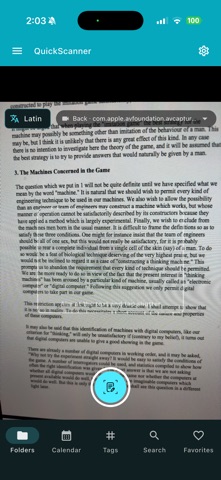
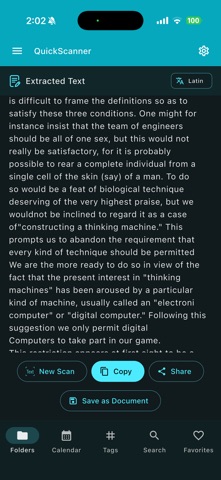
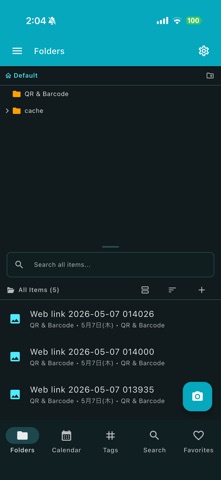
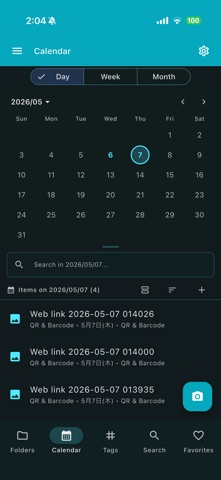
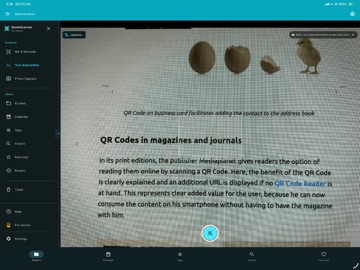
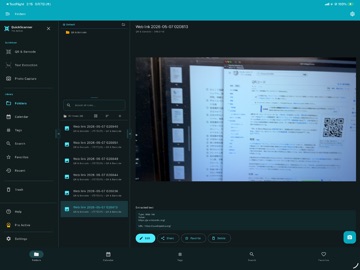
QuickScanner is a multi-mode document scanner designed for iOS and macOS. It combines smart document capture, OCR text extraction, QR/barcode scanning, and PDF generation with cloud backup. SCANNING MODES: - Document, Business Card, Receipt, ID Card, Whiteboard - Capture from camera, photo library, files, video, or screen region - Auto-shutter for hands-free capture - Auto boundary detection and perspective correction - Auto-crop with corner recognition - Flash control and continuous capture IMAGE EDITING: - 4-corner freeform crop with drag handles - Rotation (360°) and horizontal flip - Filters: Original, Magic Color, B&W, Grayscale, High Contrast - Text annotation overlay - Signature field overlay OCR TEXT EXTRACTION: - Offline OCR using Google ML Kit (no data sent to servers) - 5 language scripts: Japanese, Latin/English, Chinese, Korean, Devanagari - Extract text from scanned images and PDF pages - Extract text and QR codes from PDF and video files - Export text as TXT or Markdown files - Copy or share extracted text AI ASSIST: - AI-generated titles and tags for your scans - One-tap summary of extracted text - AI cleanup of OCR recognition errors - Structured field extraction (receipts, business cards) - Batch AI actions across multiple documents QR & BARCODE SCANNER: - Real-time detection with AR overlay - Scan QR/barcodes from camera, image/PDF files, video, or screen (macOS) - Parse WiFi, contacts (vCard), calendar events, SMS and email - One-tap actions per payload type, with warnings for sensitive data - Scan history with recent results - Auto-open URLs from QR codes - Copy and share barcode values PDF: - Searchable PDF: OCR text embedded as an invisible, searchable layer - Single and multi-page PDF generation - Password-protected PDF encryption - PDF preview with page navigation - Text extraction from PDF documents DOCUMENT LIBRARY: - Browse by type: Documents, Cards, Receipts, IDs, Whiteboards, PDFs - Folders, tags, and full-text search - Bulk selection and batch operations - Trash with soft-delete and restore CLOUD BACKUP: - Google Drive, Dropbox, OneDrive integration - Full library backup as ZIP archive with manifest - Settings export/import in backups - Remote backup upload and download CUSTOMIZATION: - 20+ theme colors with dark/light mode - Configurable auto-crop, perspective correction, and default filter - Responsive layout for mobile, tablet, and desktop QuickScanner Pro unlocks: - Ad-free experience - All premium features - Priority support Terms of Use: https://kakitiro.com/quickapps/quickscanner/terms/
Latest release
What’s New
• Bug fixes and performance improvements. • UI and design improvements. • Security updates. • Added AI-powered scan assistance for OCR cleanup, summaries, and title/tag suggestions.
Audience growth
Ratings growth
Baseline captured. Growth appears after the crawler observes a changed rating count.
Momentum comes from crawler snapshots for the tracked storefront. “Viral growth signal” means unusually fast recent rating gains; it is an indicator, not download data.
Price tracking
Price intelligence
First snapshot captured. The trend line starts after the next crawler price observation.
- First observed Aug 8, 2026 · 11:28 AM Free
Screenshots