About this app
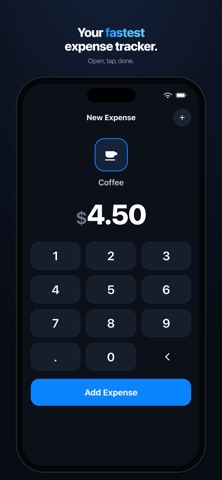
QuickSpend is the fastest, most private expense tracker on iPhone. Log a coffee, log gas, log rent — in 3 taps. No login. No account. No bank connection. Your data never leaves this device. Free to download, no ads, no tracking. WHY QUICKSPEND Most budget apps want your email, your bank password, and a monthly fee before you can log a single dollar. QuickSpend does the opposite. Open the app, tap an amount, pick a category, done. No setup, no sign-up, no cloud account to manage. THREE-TAP LOGGING Entering an expense takes about three seconds. Amount, category, save — that's the whole flow. The faster logging is, the more likely you are to actually do it, and an expense tracker only works if you use it every day. 100% OFFLINE, 100% PRIVATE Everything you enter is stored on your iPhone, on-device. There is no server, no account, and no sync. Your spending is nobody's business but yours. Works in airplane mode, on the subway, anywhere. SEE WHERE THE MONEY GOES A clean daily total and a simple monthly overview show your spending at a glance — no spreadsheets, no clutter. Browse by day, month, or year and step back through your history. OPTIONAL FACE ID LOCK Keep your finances private with Face ID or Touch ID protection. WHO IT'S FOR - People who want a simple daily spending tracker, not a full finance suite - Anyone who refuses to hand a budgeting app their bank login - Minimalists who've bounced off complex apps like YNAB or Mint - Cash and envelope budgeters who just want a fast place to log - Students and freelancers tracking spending paycheck to paycheck QuickSpend is free to download. We may add optional extras in the future, but logging your expenses will always be part of the free core. No account. No bank link. No tracking. Just you and your spending.
Audience growth
Ratings growth
Baseline captured. Growth appears after the crawler observes a changed rating count.
Momentum comes from crawler snapshots for the tracked storefront. “Viral growth signal” means unusually fast recent rating gains; it is an indicator, not download data.
Price tracking
Price intelligence
First snapshot captured. The trend line starts after the next crawler price observation.
- First observed Sep 4, 2026 · 5:06 AM Free
Screenshots