About this app
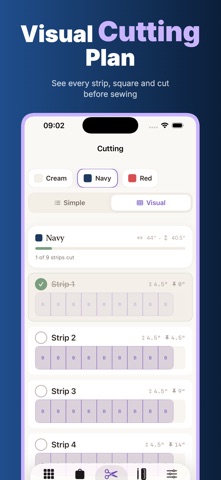
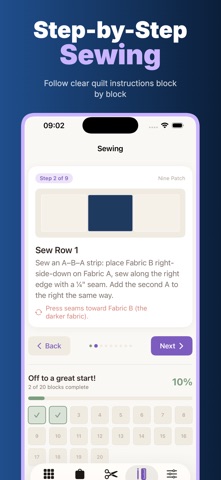
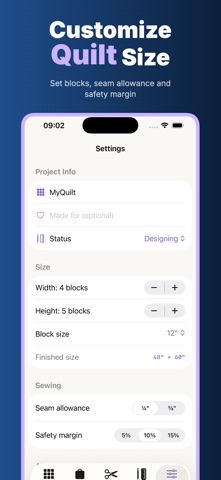
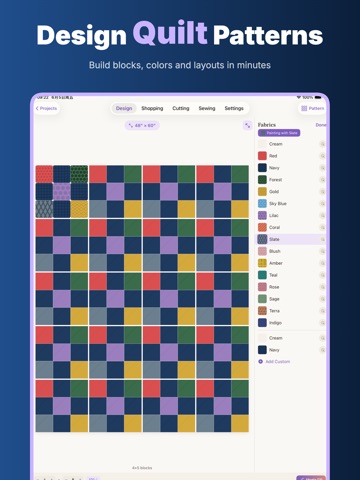
QuiltFit is a focused quilt planning workspace for quilters who want to move from idea to fabric without a spreadsheet. Start with a block pattern, choose fabrics, preview the full quilt, estimate yardage, build a shopping list, create a cutting plan and follow the sewing sequence from one app. It is made for patchwork beginners, weekend makers, guild quilters, sewing teachers and anyone who wants a clearer path from "I love this pattern" to "I know what to buy, cut and sew." QuiltFit keeps the workflow practical: design first, then fabric requirements, then cutting, then piecing. Design your quilt visually Choose a classic block pattern such as Nine Patch, Log Cabin, Half-Square Triangle or Flying Geese. Set the quilt width and height in blocks, pick a finished block size and see the finished size update as you work. The preview shows how the block repeats across the whole project, so color balance and contrast are easier to judge before you cut real fabric. Add fabrics you own or plan to buy. Use built-in colors and textures, create custom fabrics, name them, and assign them to the block. Paint a single cell, fill a role, or use Magic Fill to quickly explore layouts and compare palettes before cutting. Fabric planning and shopping list Once fabrics are assigned, QuiltFit calculates yardage estimates for each fabric based on project size, block size, seam allowance and safety margin. The shopping list turns those estimates into a checklist with fabric names, colors, quantities and optional prices. Mark items as bought, share the list, or bring it to the fabric shop. Cutting made less confusing QuiltFit turns the design into a cut list with piece counts and cut sizes. Use the simple list for a fast checklist, or the visual cutting view to see work grouped by fabric. Export a printable PDF cut list with fabric requirements and piece sizes — a clean plan you can check, print and follow. Sewing guidance block by block After shopping and cutting, QuiltFit helps you move into sewing. Illustrated steps break the selected block into smaller actions: cut pieces, arrange units, sew seams, press, assemble rows and complete blocks. Track progress across the blocks in your quilt top so the project feels manageable instead of scattered across notes, photos and memory. Project library and settings Save multiple quilts in the project library, switch between them and keep each design's fabrics, size, progress and settings together. Adjust seam allowance, safety margin, block size, project status and language from the settings screen. QuiltFit is designed as a compact planning notebook for the quilting work that happens before and during sewing. Privacy built into the workflow QuiltFit is built around five practical promises: Offline: core planning tools are available without relying on a web account. No Login: open the app and design, calculate, cut and sew without creating an account. Privacy First: quilt names, fabric choices, notes and project details stay personal. On Device: planning, yardage, cut lists, PDFs, settings and progress are handled on your device. No Cloud Upload: QuiltFit does not upload your projects, fabric lists, shopping lists, cut plans or sewing progress to its own cloud. Subscription QuiltFit Pro unlocks Magic Fill, cutting layouts and PDF export. It is a monthly or yearly auto-renewing subscription with a 3-day free trial. Payment is charged to your Apple ID after the trial and at renewal, unless cancelled at least 24 hours before the period ends. Manage or cancel in App Store account settings. Support https://5gotogo.github.io/QuiltFit-privacy/apple-review-support.html Privacy Policy https://5gotogo.github.io/QuiltFit-privacy/privacy-policy.html
Latest release
What’s New
This update adds QuiltFit Pro, an optional subscription that unlocks Magic Fill, cutting layouts and PDF export, plus a free 3-day trial. We also made general performance improvements throughout the app.
Audience growth
Ratings growth
Baseline captured. Growth appears after the crawler observes a changed rating count.
Momentum comes from crawler snapshots for the tracked storefront. “Viral growth signal” means unusually fast recent rating gains; it is an indicator, not download data.
Price tracking
Price intelligence
- First observed Aug 11, 2026 · 8:03 AM Free
Screenshots