About this app
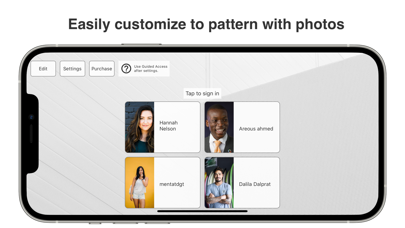
Transform your iPad into a smart, contactless reception system. Reception App: iPad Check-in lets visitors check in quickly, while staff receive instant notifications via Slack, Microsoft Teams, or Chatwork. Perfect for offices, clinics, salons, and retail stores, this visitor management system streamlines front desk operations and improves visitor experience. With Reception App, you can set up a fully functional reception in minutes—no sales calls, no complicated onboarding, no extra hardware. Simply install the app on your iPad, customize the buttons and fields, and start receiving real-time visitor alerts. Affordable pricing and a 31-day free trial make it easy to start without risk. 【Who Can Benefit】 - Offices & Coworking Spaces: Manage visitors, deliveries, and meetings without dedicated reception staff, while keeping teams updated instantly via Slack, Microsoft Teams, or Chatwork. - Clinics & Medical Practices: Reduce waiting room congestion and notify staff instantly when patients arrive. - Beauty Salons & Spas: Welcome guests and alert stylists or therapists without interrupting service. - Retail Stores & Showrooms: Greet customers and route them to the right staff without delay. - Small Businesses: Replace manual visitor logs with an automated, professional solution. 【Key Features】 ■ Customizable Check-in Buttons Create buttons like “Interview,” “Delivery,” or “Guest” based on visitor type. Assign different notification destinations for each button, such as a Slack channel or Teams group. ■ Flexible Input Fields Choose which details to collect: visitor name, staff to visit, purpose of visit, and more. Hide unnecessary fields to keep the process quick and user-friendly. ■ Destination-based Notifications Send interview notifications to HR, delivery notifications to admin—no more phone transfers or wasted time. ■ Custom Branding Upload your company logo, choose background images, and match your brand colors. Edit button labels and instructions to suit your needs. ■ Energy-saving Standby Mode The screen dims after 30 seconds of inactivity to prevent burn-in and save power. Wake it with a tap. ■ App Lock (Guided Access) Lock the app to prevent accidental exits or misuse. Learn how: https://support.apple.com/en-us/HT202612 【Advantages Over Other Apps】 - No sales calls or inquiries required before starting. - Install and configure within minutes. - Affordable at $9.69/month, much lower than many competing reception systems. - Works entirely on your iPad—no expensive kiosk hardware needed. 【Supported Chat Tools】 - Slack - Chatwork - Microsoft Teams (Microsoft 365) 【Pricing】 Enjoy all features free for the first 31 days. After the trial, the app continues to work, but a subscription removes the payment screen. Subscription: $9.69/month, auto-renewable. 【Subscription Details】 - Payment is charged to your iTunes Account. - Subscriptions renew unless canceled at least 24 hours before the end of the current period. - Your account will be charged for renewal within 24 hours before the end of the current period. - Manage subscriptions and turn off auto-renewal in your App Store account settings. - If you purchase during the free trial, the unused portion of the trial is forfeited. 【Privacy Policy & Terms】 Privacy Policy: https://reception.sorovan.com/privacy Terms of Service: https://reception.sorovan.com/tos Photo Credits: Photo by Hannah Nelson from Pexels https://www.pexels.com/photo/close-up-photography-of-a-woman-near-wall-1065084/ Photo by Areous Ahmad from Pexels https://www.pexels.com/photo/close-up-photo-of-smiling-man-2122949/ Photo by mentatdgt from Pexels https://www.pexels.com/photo/woman-wearing-white-sleeveless-shirt-and-white-denim-shorts-1082962/ Photo by Dalila Dalprat from Pexels https://www.pexels.com/photo/man-in-gray-shirt-standing-while-smiling-1844547/
Latest release
What’s New
細かいアプリの改善をおこないました
Audience growth
Ratings growth
Baseline captured. Growth appears after the crawler observes a changed rating count.
Momentum comes from crawler snapshots for the tracked storefront. “Viral growth signal” means unusually fast recent rating gains; it is an indicator, not download data.
Price tracking
Price intelligence
First snapshot captured. The trend line starts after the next crawler price observation.
- First observed Aug 14, 2026 · 1:18 AM Free
Screenshots