About this app
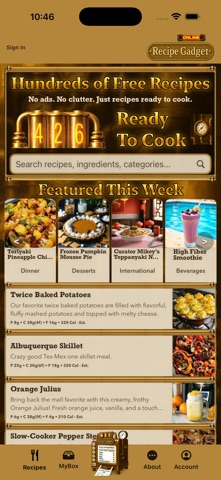
HUNDREDS OF FREE, AD-FREE RECIPES Recipe Gadget doesn’t hand you an empty recipe box. Sign in and start exploring hundreds of free public recipes covering breakfast, main dishes, desserts, beverages, outdoor cooking, and much more. Import up to 10 recipes of your own, absolutely free! Discover new ideas through weekly Featured Recipes, search the complete public collection, save favorites to MyBox, and keep your own recipes organized alongside them—all without advertising. BRING YOUR RECIPES WITH YOU Found a recipe in Safari? Share it directly to Recipe Gadget. You can also import recipes from: • Photos and recipe cards • Your camera • Websites • PDF documents • Word documents • Copied and pasted text Recipe Gadget turns the source into an editable recipe, suggests its title, description, category, and dish type, and organizes the ingredients and instructions. You review everything before saving. Import multiple recipe images together and keep the original images visible for reference while checking the finished recipe. It’s especially useful for preserving handwritten cards, cookbook pages, clippings, and treasured family recipes. BUILD YOUR OWN RECIPE COLLECTION Create recipes from scratch or customize imported recipes with flexible ingredients, quantities, instructions, notes, categories, and presentation options. Keep personal recipes private, publish recipes you want to share, collect favorites, and preserve the family recipes that deserve to survive another generation. Browsing the public recipe collection is free and ad-free. Optional plans expand recipe creation, importing, and illustration allowances. MAKE EVERY RECIPE LOOK ITS BEST Image Gadget creates realistic food illustrations for recipes that don’t already have a photograph. Choose the camera view, portion, container, plating, setting, and mood—or let Recipe Gadget make appropriate selections for the dish. Crop, zoom, reposition, and frame the finished image before saving it. Standard and Ultra Illustration Creations provide options for different recipe needs. Additional Illustration Creations are available as an optional one-time purchase. COOK, SAVE, AND SHARE • Adjust recipe quantities while preserving the original recipe • Follow recipes while cooking with Kitchen Companion • Export your recipes as clean, printable PDFs • Share approved recipes with friends and family • Track achievements as you build your collection • Learn major features through built-in tutorials PRIVACY FIRST No advertising. No ad-driven profiling. No unnecessary tracking. Recipe Gadget is designed to help you discover, build, import, organize, illustrate, cook, and preserve recipes—not turn your recipe box into another advertising platform. Hundreds of free recipes are waiting. Bring the rest of your collection with you. Optional subscriptions and in-app purchases expand selected creation, import, and illustration allowances. Terms of Use: https://www.apple.com/legal/internet-services/itunes/dev/stdeula/ Privacy Policy: https://recipegadget.com/privacy-policy.html
Latest release
What’s New
Hundreds of free, ad-free recipes are ready the moment you sign in—and Recipe Gadget 1.2 makes it easier to discover, import, illustrate, cook, and preserve them. Share recipes directly from Safari, or import them from photos, websites, PDFs, Word documents, and pasted text through a guided review experience. Version 1.2.1 further improves import accuracy and edge-case handling, while refining Image Gadget recommendations, defaults, settings, and occasion choices for better food illustrations. Also included: weekly Featured Recipes, Beverage and Outdoor Cooking collections, printable PDF export, image cropping and positioning, Cook Mode, and extensive improvements throughout the app.
Audience growth
Ratings growth
Baseline captured. Growth appears after the crawler observes a changed rating count.
Momentum comes from crawler snapshots for the tracked storefront. “Viral growth signal” means unusually fast recent rating gains; it is an indicator, not download data.
Price tracking
Price intelligence
First snapshot captured. The trend line starts after the next crawler price observation.
- First observed Aug 21, 2026 · 2:58 PM Free
Screenshots