About this app
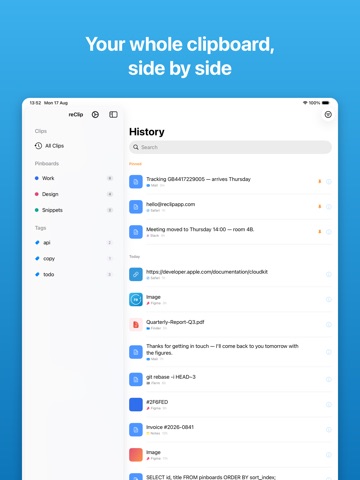
Everything you copy on your Mac, waiting on your iPhone. reClip keeps your Mac's clipboard history and syncs it to your iPhone and iPad through your own iCloud account. The link you copied at your desk, the address from an email, the snippet you keep reusing — all of it is a tap away, wherever you are. PASTE INTO ANY APP The reClip keyboard puts your clipboard history inside every app on your phone. Switch to it in Safari, Messages, Mail or anywhere you can type, tap a clip, and it's inserted. No app switching, no copy-and-come-back. FIND ANYTHING Search your whole history by what you copied — or by the app you copied it from. Filter to just links, images or files when you know roughly what you're after. KEEP WHAT YOU REUSE Pin the clips you need daily. Group them into pinboards, label them with tags, and build them up on either device — changes sync both ways. AT A GLANCE Add the widget to your Home Screen for your most recent clips, and use Siri Shortcuts to copy your latest clip or search your history hands-free. PRIVATE BY DESIGN Your clips sync through your own iCloud account. They never pass through reClip's servers, because there are none — we can't read your clipboard, and there's no account to create just to use the app. REQUIRES reClip FOR MAC This app is the companion to reClip for Mac, which is what captures your clipboard. iOS doesn't let any app watch the clipboard in the background, so your iPhone receives and pastes clips rather than recording them. Both apps sign in to the same iCloud account and sync automatically. FREE AND PRO Free includes your 20 most recent clips, and anything older stays available for 120 hours. reClip Pro unlocks unlimited history, image and file clips, and advanced search and filters. Pro follows your reClip account or license key across every device you use.
Audience growth
Ratings growth
Baseline captured. Growth appears after the crawler observes a changed rating count.
Momentum comes from crawler snapshots for the tracked storefront. “Viral growth signal” means unusually fast recent rating gains; it is an indicator, not download data.
Price tracking
Price intelligence
First snapshot captured. The trend line starts after the next crawler price observation.
- First observed Aug 21, 2026 · 8:17 AM Free
Screenshots