About this app
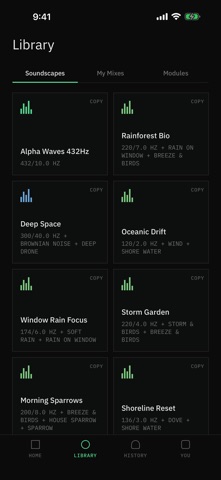
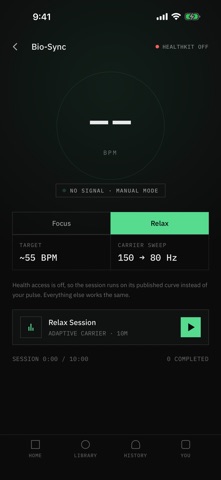
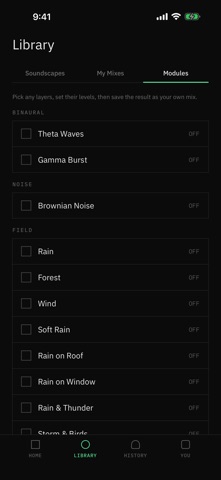
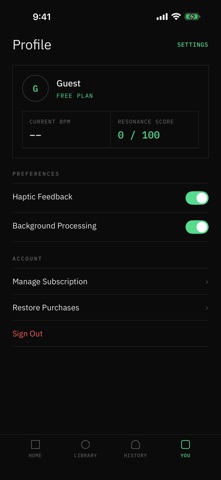
Focus deeper, fall asleep faster, and quiet a loud day — with sound your iPhone generates in real time. Resonance is two tools in one: a live white, pink, and brown noise machine, and 13 binaural beat presets spanning the Delta, Theta, Alpha, Beta, and Gamma brain wave ranges. Nothing streams, nothing downloads, and nothing ever loops. Resonance Plus is required to use the app. One subscription unlocks every feature. WHY IT SOUNDS DIFFERENT Most noise apps play a short recording over and over. Your ear finds the loop point within minutes and starts waiting for it. Resonance synthesizes every sample on your device, so the sound never repeats — it simply keeps going, for as long as you need it. WHAT YOU GET • White, pink, and brown noise generated continuously on device — no loops, no streaming, no downloads • 13 binaural presets across the Delta, Theta, Alpha, Beta, and Gamma brain wave ranges • A soundscape library with layered presets like Deep Drone, Oceanic Drift, and Rainforest Bio • Build your own mixes — stack a focus tone under rain or wind, then save it for next time • A session timer for deep work blocks, study sprints, power naps, or winding down at night • Spatial Flow — head-tracked spatial audio with compatible AirPods • Bio-Sync — optional heart-rate-responsive sessions via Apple Health • Works fully offline. No account, no ads, no sign-up BINAURAL PRESETS Delta — Deep Sleep, Quiet Rest Theta — Deep Meditation, Creative Flow, Lucid Dreams Alpha — Calm Focus, Stress Relief, Morning Clarity Beta — Deep Focus, Study Mode, Energy Boost Gamma — Fast Focus, Insight HOW IT WORKS 1. Pick colored noise, a binaural preset, a soundscape, or one of your own mixes. 2. Set a comfortable volume and a session length. 3. Put on headphones for binaural or spatial sessions, then press play. Binaural beats need stereo headphones — each ear receives a slightly different tone, and the beat is what you hear between them. Colored noise works on speakers or headphones. GOOD FOR Deep work and coding sessions. Studying and exam prep. Reading and writing. Falling asleep and staying asleep. Power naps. Noisy apartments, open-plan offices, and long flights. Masking street noise, snoring, and hum. Settling an overstimulated afternoon. BUILT FOR CALM, NOT CLUTTER No social feed. No advertising profile. No account required. Your preferences stay on your device. Resonance opens straight into sound instead of a sign-up wall. OPTIONAL APPLE HEALTH INTEGRATION Bio-Sync can read heart-rate data from Apple Health only after you grant permission. Health data is processed on device for session feedback. It is never used for advertising and never sold. LISTEN SAFELY Keep the volume at a comfortable level. Do not use immersive audio while driving, cycling in traffic, or anywhere you need full awareness of your surroundings. Resonance is a wellness and focus tool. It is not a medical device and does not diagnose, treat, cure, or prevent any condition. Individual experiences vary. SUBSCRIPTION A Resonance Plus subscription is required to use Resonance. It is available as a weekly or yearly auto-renewing subscription, or as a one-time lifetime purchase. Payment is charged to your Apple Account at confirmation of purchase. The subscription renews automatically unless auto-renew is turned off at least 24 hours before the end of the current period, and your account is charged for renewal within 24 hours before the period ends. Subscriptions are managed by Apple, not by Resonance. You can view, change, or cancel your subscription at any time in the Settings app under your name > Subscriptions, or at: https://apps.apple.com/account/subscriptions Terms of Use: https://resonance.avunia.com/terms Privacy Policy: https://resonance.avunia.com/privacy Support: https://resonance.avunia.com/support
Audience growth
Ratings growth
Baseline captured. Growth appears after the crawler observes a changed rating count.
Momentum comes from crawler snapshots for the tracked storefront. “Viral growth signal” means unusually fast recent rating gains; it is an indicator, not download data.
Price tracking
Price intelligence
First snapshot captured. The trend line starts after the next crawler price observation.
- First observed Aug 18, 2026 · 11:55 AM Free
Screenshots