About this app
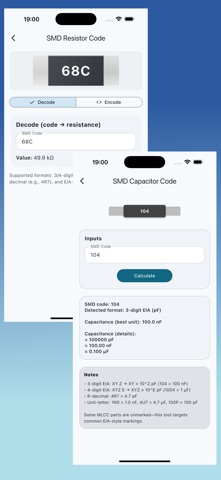
RF Toolbox — All-in-One RF Engineering Calculator & Design Suite RF Toolbox is a practical, field-ready app built for RF engineers, students, and radio hobbyists who need fast, reliable calculations and design utilities in one place. From impedance matching and transmission line work to filter and attenuator synthesis, RF Toolbox helps you move from idea to implementation with less friction. KEY FEATURES Impedance & S-Parameter Tools • Smith Chart utilities for impedance visualization and matching workflows • S11 parameter / reflection analysis support • Reflection coefficient and VSWR calculators Matching Networks • L, Pi (π), and T matching network calculators • Stub tuner tools for transmission-line matching • Filters (Passive & RF) • RC and RL passive filter calculators • LC low-pass prototypes: Butterworth and Chebyshev (up to 8th order) • Microstrip filters: band-pass and band-reject (notch) • RLC Networks • RLC series and parallel calculators for resonance and frequency behavior Attenuators • Pi (π), T, and Bridge-T attenuator calculators for common RF pad designs • Cascaded Networks • Cascaded network calculations for chained RF blocks and stages Antenna & Propagation • Antenna design utilities (core RF design helpers) • Path loss calculators • Friis link budget calculator • Power density calculator • Radar maximum range calculator Component Toolkits • Inductor design: air-core, spiral, and multi-layer air-core • Resistors: SMD code, color code, and series/parallel network calculator • Capacitors: SMD code and series/parallel network calculator DESIGNED FOR SPEED AND ACCURACY RF Toolbox is organized for quick access—open the tool you need, enter values, and get results immediately. Whether you’re prototyping a matching network, checking VSWR, sizing an attenuator, or running a quick link budget, RF Toolbox keeps your workflow efficient. Download RF Toolbox and keep essential RF design tools in your pocket.
Latest release
What’s New
improved the user interface, few bugs fixed
Audience growth
Ratings growth
Baseline captured. Growth appears after the crawler observes a changed rating count.
Momentum comes from crawler snapshots for the tracked storefront. “Viral growth signal” means unusually fast recent rating gains; it is an indicator, not download data.
Price tracking
Price intelligence
First snapshot captured. The trend line starts after the next crawler price observation.
- First observed Aug 10, 2026 · 3:47 PM Free
Screenshots