About this app
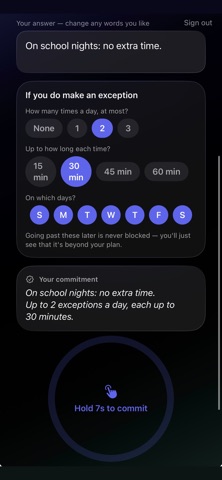
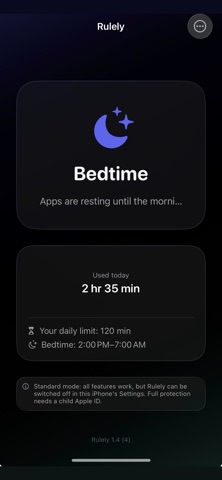
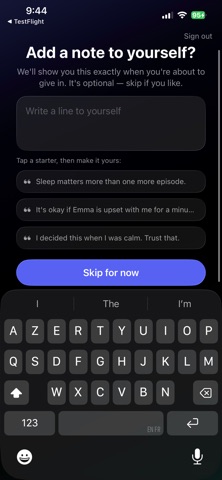
The "five more minutes" fight. Every night. Rulely ends it — not by watching your kid, but by holding the limit so you don't have to be the bad guy. You already know the rules you want. The hard part is enforcing them at the end of a long day, when you're tired and they're persistent. Rulely takes that job off your plate. HOW IT WORKS Set your rules once, in a calm moment — screen time limits and bedtime, with separate school-day and weekend schedules Your child's phone follows the rules automatically. The limit holds without you saying a word. Need an exception? Real life happens. Overrides exist — they just take a deliberate moment instead of a worn-down "fine." Your child can request extra time through the app instead of negotiating with you at bedtime. DECIDE ONCE, NOT EVERY NIGHT Before the first hard evening, you decide how you want to handle requests for more time — and write yourself a line to read in the moment. When the moment comes, Rulely shows you your own words. Granting extra time takes a deliberate hold and a short pause, so it stays a choice instead of a reflex. WHAT RULELY IS NOT Rulely is not a monitoring app. No message reading, no location tracking, no activity reports on your child. Other apps give you surveillance over your kid. Rulely gives you consistency — the rules you already decided on, enforced calmly, every night. BUILT ON APPLE'S SCREEN TIME Rulely uses Apple's Family Controls framework, so enforcement happens at the system level — not an app your child can swipe away. Works with a child Apple ID in Family Sharing for full protection, or in standard mode on the child's device without one. Designed for parents of kids 10–14. Questions? Reach us anytime through the app or at the support link below.
Latest release
What’s New
— Rulely now tells you clearly when it isn't active yet, so setup can't quietly finish halfway. — Finish pairing whenever your child's phone is in hand — your code stays one tap away, and we'll remind you in the evening. — Clearer setup steps and fixes throughout.
Audience growth
Ratings growth
Baseline captured. Growth appears after the crawler observes a changed rating count.
Momentum comes from crawler snapshots for the tracked storefront. “Viral growth signal” means unusually fast recent rating gains; it is an indicator, not download data.
Price tracking
Price intelligence
First snapshot captured. The trend line starts after the next crawler price observation.
- First observed Aug 20, 2026 · 10:56 PM Free
Screenshots