About this app
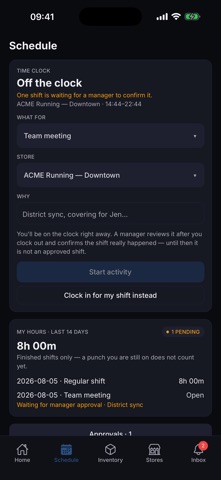
Know your store at a glance. RunOps opens to a live dashboard: six KPIs (sales-per-hour, units-per-transaction, coverage, insole & sock attachment, dollars-per-transaction), a revenue-pulse chart with a momentum badge and a last-year overlay, and a weekly-goal tracker that tells you if you're on pace while there's still time to do something about it. Scope everything to one store or all of them, over 7 to 60 days. Same numbers you see on the web platform. Find any item in seconds. Search inventory by product name, SKU, brand, or UPC, right from Home or the Inventory tab. See on-hand, days-of-supply, weekly velocity, and margin, filter by store and stock level, and answer a customer's "do you have these in a 10?" without leaving the floor. Catch problems early. RunOps surfaces inventory anomalies: a SKU that dropped to zero without a sale, a sudden velocity spike, negative stock after a return. Top 5 on Home, full list one tap away, each with a transaction trail that shows exactly what happened, when, and who was involved. Inventory you can trust. Filter by all / low stock / out of stock and open any product's full story: a 30-day summary plus an item-level ledger of every sale, return, and receipt. Your schedule, your way. Clock in and out by store, see your upcoming shifts, post and claim shift trades, and request time off, all without leaving the floor. Start an activity when you're working outside a scheduled shift, and a manager confirms it afterwards. Every store, every alert. Browse all your stores with live KPI snapshots. An inbox keeps actionable alerts one tap away with an unread badge, and notifications reach your phone so you don't have to go looking. Make Home yours. Turn dashboard panels on or off and reorder them to match how you work. Managers get the full performance overview. Floor associates get a lighter, task-focused board: shift, clock, quick search, stock to watch.
Latest release
What’s New
Notifications, and an easier time-off request RunOps can now reach you on your phone. New shifts, approvals and time-off updates show up as notifications, so you don't have to open the app to find out. To turn them on, sign in and tap Allow when your phone asks. Your profile shows whether they're on for this device. Picking dates for a time-off request is clearer now. Choose a date, confirm it, and you're back on the form. No more guessing how to close the calendar. Plus the usual round of fixes.
Audience growth
Ratings growth
Baseline captured. Growth appears after the crawler observes a changed rating count.
Momentum comes from crawler snapshots for the tracked storefront. “Viral growth signal” means unusually fast recent rating gains; it is an indicator, not download data.
Price tracking
Price intelligence
First snapshot captured. The trend line starts after the next crawler price observation.
- First observed Aug 19, 2026 · 5:46 AM Free
Screenshots