About this app
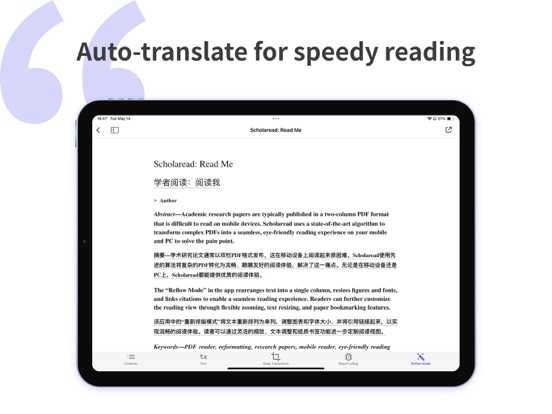
Scholaread is an integrated translator tool for reading PDFs, translating papers, and managing literature. It features the world's leading translation engine, aiming to solve problems with full-text translation, side-by-side translation, and specialized terminology translation in foreign literature reading. It includes a self-developed PDF layout algorithm that allows for paper layout rearrangement and paragraph-by-paragraph translation. It supports synchronized reading across computers, smartphones, and tablets, making reading academic papers as simple as reading public account posts. Literature Reading ・Rearrangement Mode: One click transforms complex dual-column paper layouts into waterfall layouts suitable for mobile reading. ・AI-Assisted Reading: Big data AI models summarize articles accurately, making it easy to skim through papers. ・Instant Viewing: Directly open and read graphs and citations without the need to flip through pages. Paper Translation ・Big Data Translation: Professional academic translation engine + AI term explanations, supporting multiple languages including English, French, German, Korean, and Japanese. ・Side-by-Side Translation: Synchronized translation displays text and translations together, allowing for fluent reading of SCI in your native language. ・Screenshot Translation: Supports translating snippets captured from papers. ・Chart and Formula Translation: Includes a specialized engine for translating formulas, images, and code. Literature Management ・Zotero Synchronization: One-click import into the Zotero library, providing extensive cloud reading space and encompassing global academia. ・Data Interconnection: Synchronized data across mobile, tablet, and computer, ensuring consistent reading progress and creating a cloud-based literature translation reader. Other Highlights ・Table of Contents Generation: Automatically generates mini-titles for papers, making it easier to navigate research paths. ・Highlighting and Notes: Freely highlight and annotate, making key information clear at a glance. In the boundless sea of learning, reach the shore sooner! Scholarread hopes to help you reduce late nights and increase inspiration, ensuring every minute spent on studying and writing papers is effective.
Latest release
What’s New
What' New • Start Agent sessions, keep tasks moving anytime, and sync progress across devices. • Improved Experience: Fixed known issues and enhanced overall performance. Please feel free to contact us at support@scholaread.com Happy Reading!
Audience growth
Ratings growth
Baseline captured. Growth appears after the crawler observes a changed rating count.
Momentum comes from crawler snapshots for the tracked storefront. “Viral growth signal” means unusually fast recent rating gains; it is an indicator, not download data.
Price tracking
Price intelligence
First snapshot captured. The trend line starts after the next crawler price observation.
- First observed Aug 6, 2026 · 2:20 PM Free
Screenshots