About this app
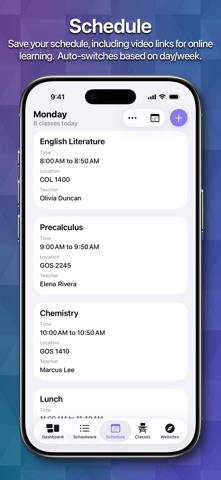
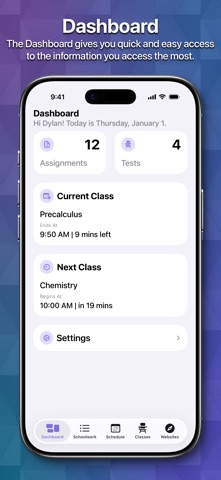
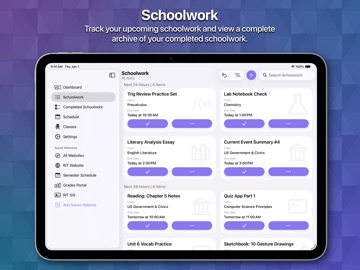
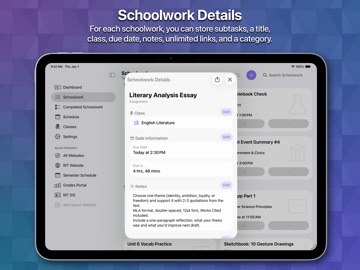
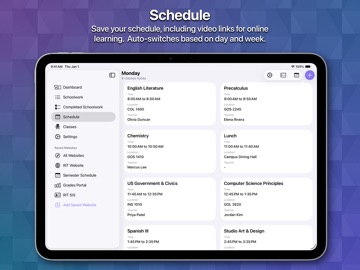
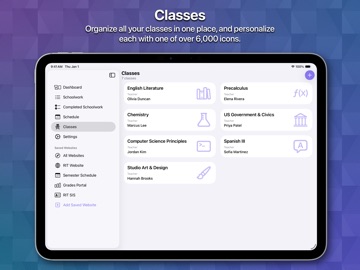
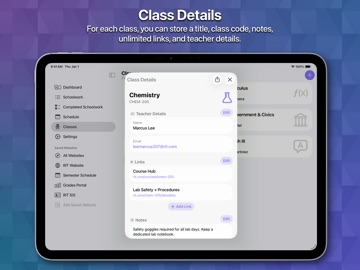
School Assistant by Sun Apps is a simple but powerful school planner app. It allows you to quickly and easily keep track of your homework and tests, manage your schedule, save all your class info, quickly access saved websites, and more. First, as a student myself, I know how hard it can be to pay for these types of apps. So, School Assistant is 100% free: no subscriptions, no paywalls, no premium features, and no ads! There is a tip jar if you feel like supporting, though (these are the in-app purchases the App Store shows). Schoolwork: - Manage your upcoming assignments and tests - Sort by due date, class, category, alphabetically, or manually - Add a related class, due date, links, and notes - Add Subtasks to your schoolwork to keep track of large assignments - Schedule reminders - Highlight upcoming and overdue schoolwork - Keep an entire archive of your completed schoolwork - View how many assignments/tests you have right from your Home Screen with Widgets Schedule: - Keep track of your classes for every day - Add associated teacher and room information (or, add a link for online classes) - Automatically switch days based on the day of the week - Automatically switch between two weeks (great for A/B week schedules) - Manually switch between up to ten weeks - See your current class and next class on the Dashboard and with Widgets Classes: - A dedicated place to manage all your class info - Store your teacher’s name and email - Store a title, class code, links, and notes for each class - Assign an icon to each class, which also shows in Schoolwork Apple Watch App: - Super quick access to your most important information - View your Schoolwork, automatically sorted into assignments and tests - View your Schedule for any day - View your current and next classes, and how long you have left - Set a custom theme color to match your Watch, band, or outfit - Designed for quick interactions Other features: - Save website bookmarks for quick and easy access right in the app - Set a custom accent color - Theme the entire app with a color of your choosing - Over 20 app icon choices - Liquid Glass design - Full and automatic data syncing over iCloud - Tight iOS and iPadOS integration with support for features like Slide Over and Split View, iPad cursor, keyboard shortcuts, system sidebars, Home Screen widgets, Dynamic Text, and multi-window support - Support for iPhone, iPad, iPod touch, Mac, Apple Watch, and Apple Vision Pro - Designed with quick and easy usability in mind - Full support for Dark, Tinted, and Clear Home Screen modes
Latest release
What’s New
Important Note: this will be the FINAL RELEASE to support iOS 15, iOS 16, macOS 12, and macOS 13. Only 2% of users are still running these versions, but it takes considerable time and effort for me to continue supporting them. Starting with the next release, iOS 17 / macOS 14 will be the minimum version. I apologize for any inconvenience. Please know, if you are still running those versions and are unable to update, the app will continue to work as it currently does! New Features and Improvements - You can now use the app in landscape mode on all iPhone models, regardless of screen size, in accordance with Apple’s new guidance - Improved iCloud syncing - Tip Jar prices now show in your local currency - New “Developer” app icon choice Bug Fixes - Fixed an issue where playing a sound effect could cause the app to hang - Fixed some visual issues in the Setup experience - Fixed some issues with switching between Light and Dark Mode
Audience growth
Ratings growth
Momentum comes from crawler snapshots for the tracked storefront. “Viral growth signal” means unusually fast recent rating gains; it is an indicator, not download data.
Price tracking
Price intelligence
- First observed Sep 11, 2026 · 10:17 AM Free
Screenshots