About this app
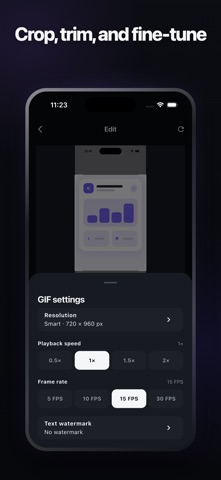
Turn the important part of your screen into a clear, easy-to-share GIF. ScreenGIF is built for one job: turning screen content into GIFs. Choose an existing screen recording, crop out distractions, trim it to the moment that matters, preview the result, then save or share it. The entire workflow is designed around turning screen content into GIFs, without a complicated video-editing timeline. Great for: • Showing how an app or website works • Reproducing issues and reporting bugs • Creating short tutorials and step-by-step guides • Demonstrating product features and interactions • Sharing workflows in chats, documents, and project spaces Editing designed for screen content: • Crop freely or start with a common aspect ratio • Set the exact start and end of the moment you need • Size the output intelligently to balance clarity and file size • Adjust frame rate and playback speed • Add a text watermark when needed • Preview the GIF and its estimated size before export • Reopen, save, and share recent exports All GIF processing happens on your device. No upload or account is required.
Audience growth
Ratings growth
Baseline captured. Growth appears after the crawler observes a changed rating count.
Momentum comes from crawler snapshots for the tracked storefront. “Viral growth signal” means unusually fast recent rating gains; it is an indicator, not download data.
Price tracking
Price intelligence
First snapshot captured. The trend line starts after the next crawler price observation.
- First observed Aug 18, 2026 · 3:56 PM Free
Screenshots