About this app
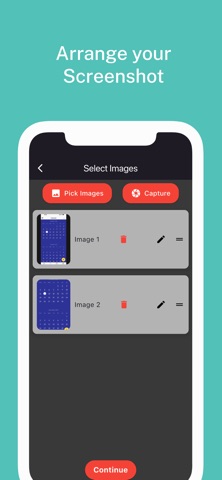
Transform your screenshots and images into polished, customizable PDFs with ScreenPDF! This easy-to-use app lets you convert screenshots or any photo from your gallery into professional PDF documents, perfect for sharing, printing, and storing. Key Features: *Screenshot & Image to PDF: Instantly convert screenshots or pictures into high-quality PDFs straight from your gallery. *Edit Before You Convert: Use our intuitive editing tools to refine images before generating your PDF, so each document looks just right. *Customizable Margins & Layouts: Choose from multiple margin options and layouts to fit your PDF needs. Perfect for any project or presentation. *Seamless & Fast PDF Creation: Enjoy quick, reliable PDF generation with a smooth, user-friendly experience. ScreenPDF is your all-in-one solution for effortless PDF creation and editing. Download today and simplify your PDF workflow! Privacy Policy:- https://blacksheepmedia.co.nz/privacy-policy-pdfshot Terms of Use: https://www.apple.com/legal/internet-services/itunes/dev/stdeula/
Latest release
What’s New
Fixed Bugs.
Audience growth
Ratings growth
Baseline captured. Growth appears after the crawler observes a changed rating count.
Momentum comes from crawler snapshots for the tracked storefront. “Viral growth signal” means unusually fast recent rating gains; it is an indicator, not download data.
Price tracking
Price intelligence
First snapshot captured. The trend line starts after the next crawler price observation.
- First observed Aug 6, 2026 · 3:26 PM Free
Screenshots