About this app
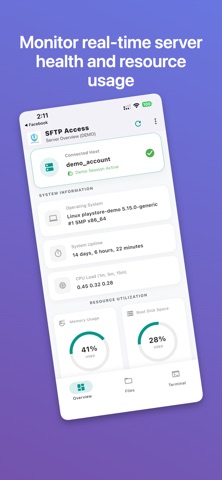
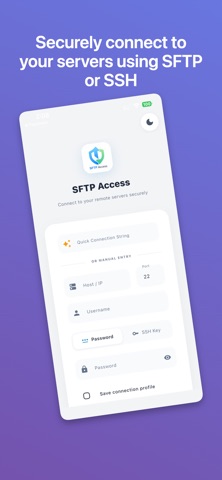
Manage your remote servers, websites, and infrastructure right from your pocket with SFTP Access, the lightning-fast, premium SSH and SFTP client designed for security and ease of use. Whether you are a system administrator, web developer, or IT professional, SFTP Access provides a beautiful, intuitive interface to monitor system resources, execute terminal commands, and manage your files—all secured by industry-standard encryption. Powerful Server Management System Dashboard: Instantly view real-time server health, including OS details, uptime, CPU load, RAM usage, and root disk space. Full SSH Terminal: Execute commands flawlessly with a built-in, responsive terminal emulator. Advanced File Browser: Navigate your remote directories, manage configurations, and oversee your file system with ease. Quick Connect: Paste your standard SSH connection strings to instantly parse host, port, and user details. Multi-Server Profiles: Save and organize multiple connection profiles for one-tap access to your entire infrastructure. Uncompromising Security Private Key Authentication: Connect securely using passwords or your own private keys (.pem, id_rsa), including passphrase support. 100% Local Storage: Your credentials, passphrases, and server IP addresses are heavily encrypted and stored safely on your local device. We never transmit or store your server data externally. Biometric App Lock: Secure the app itself with Fingerprint or Face ID authentication, ensuring no one can access your servers even if your phone is unlocked. One-Tap Disconnect: Terminate your active SSH sessions cleanly and instantly. Premium User Experience Dark & Light Modes: Seamlessly switch between a sleek dark theme and a clean light theme to match your environment. Dynamic UI: Enjoy a modern, responsive interface with smooth animations and intuitive navigation. Customizable Settings: Tailor your notifications, appearance, and security preferences directly within the app. Take control of your infrastructure with absolute confidence. Download SFTP Access today and put the power of the command line in the palm of your hand.
Audience growth
Ratings growth
Baseline captured. Growth appears after the crawler observes a changed rating count.
Momentum comes from crawler snapshots for the tracked storefront. “Viral growth signal” means unusually fast recent rating gains; it is an indicator, not download data.
Price tracking
Price intelligence
First snapshot captured. The trend line starts after the next crawler price observation.
- First observed Aug 26, 2026 · 6:30 PM Free
Screenshots