About this app
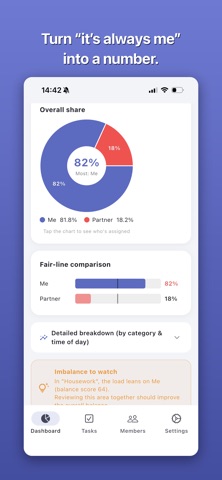
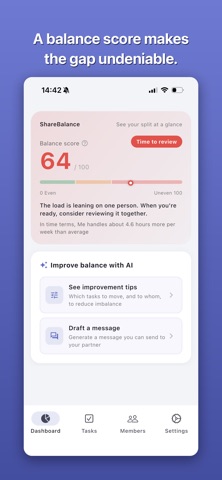
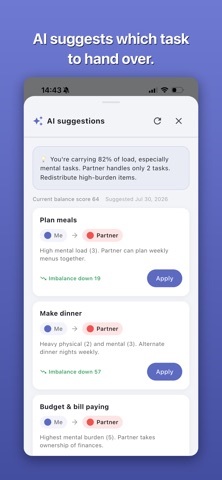
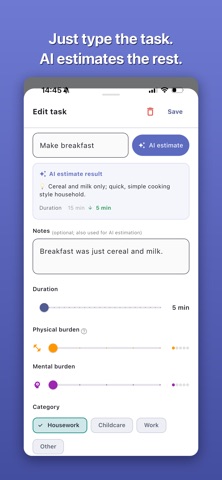
Do household chores and childcare ever feel like "somehow it's always on me"? ShareBalance turns the burden of tasks between family members, partners, and teams into numbers. Set how long each task takes, how often it happens, and how physically and mentally demanding it is — and the app scores each person's burden, so you can see who is carrying how much. ----- See the imbalance at a glance ----- The dashboard shows a balance score (0–100) and a pie chart. Closer to 0 means fair; closer to 100 means the load sits on one person. Break it down by category (housework, childcare, work), time of day, and weekday/weekend — and tap any row to see the tasks behind it. It even puts the gap in hours: "about X more hours per week than average." ----- Estimates tuned to your home ----- "Making dinner" means something different depending on your kids' ages, how you cook, and how big your home is. Tell ShareBalance about your household — children, cooking style, home size, pets, whether both partners work, plus a free note — and AI uses it as the basis for every estimate. You can re-estimate all existing tasks at once, compare "typical estimate → your home," and apply only the ones you agree with. ----- Talk with numbers, not feelings ----- The burden score is "duration × frequency × (physical + mental burden) × share." The same chore feels different to different people, so you can adjust each member's sensitivity to physical and mental load. ----- AI helps you build a fair split ----- - Task estimation: enter a task name and get duration, burden, and category — notes are taken into account - Rebalance suggestions: which task to move, from whom to whom, with the effect calculated. Apply with one tap - Bulk add: turn "I take out the trash every morning and vacuum on weekends" into multiple tasks at once - Discussion messages: from a chore's real burden (frequency, time, current share %), draft a message that's easy to bring up — in the tone you choose ----- Assignments that fit real life ----- Assign a single owner, or split by "weekday/weekend" or "by day of the week." Mom on weekdays, Dad on weekends. Trash only on Mondays and Thursdays. For tasks shared by two people, fine-tune the ratio with a slider. ----- Get started fast with templates ----- Setup takes four steps: pick how you'll use the app, add members, choose a template. There are 8 — homes without kids, with infants, with school kids, with teens, dual-income, and caregiving households, plus small teams and engineering teams. A built-in guide explains every term along the way. ----- Your data stays on your device ----- No account needed. Member names and tasks are stored only on your device and are never shared with other users. Your input leaves the device only when you use an AI feature. ----- Main features ----- - Automatic burden scoring (time × frequency × physical/mental burden) - Balance score (0–100), share pie chart, and comparison against the fair line - Imbalance by category / time of day / weekday & weekend, tappable to the tasks - AI estimates based on your household profile, plus bulk re-estimation - Per-member sensitivity weights - Weekday/weekend and per-day assignments, with a share slider for two-person tasks - Sort tasks by category, heaviest burden, or unassigned first - English & Japanese (follows your device language) ----- Good to know ----- - Free to use. The app shows ads (a banner, and a video ad when you use an AI feature) - AI estimates and suggestions are guidance — adjust them to fit your household Chores and childcare are a pile of "invisible work." Turn the burden into numbers, and find a split everyone can agree on.
Latest release
What’s New
Fixed minor bugs.
Audience growth
Ratings growth
Baseline captured. Growth appears after the crawler observes a changed rating count.
Momentum comes from crawler snapshots for the tracked storefront. “Viral growth signal” means unusually fast recent rating gains; it is an indicator, not download data.
Price tracking
Price intelligence
First snapshot captured. The trend line starts after the next crawler price observation.
- First observed Sep 7, 2026 · 7:56 PM Free
Screenshots