About this app
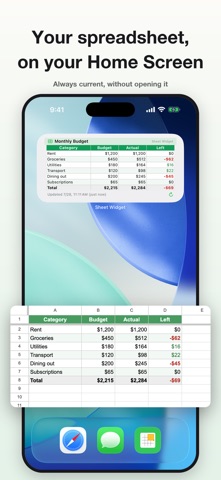
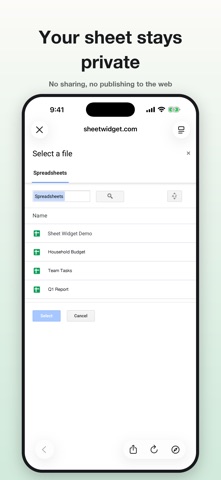
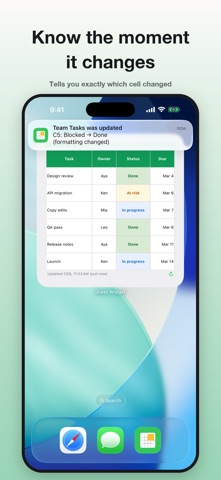
The sheet you open a dozen times a day. Put it on your Home Screen and just look at it. Borders, background colors, and formatting are reproduced as-is. ■ No sharing or web publishing required You never have to "publish to the web" or create a share link. Your sheet stays private — you just pick the range you want to see. ■ Simple to set up Pick a file, a sheet, and a range. That's it. Formula results and IMAGE function output show up exactly as they are. ■ Built with no server Sheet Widget has no backend at all. Your credentials live only in your iPhone's Keychain, and your sheet content is never sent to us or anyone else. No ads, no tracking. ■ Free • 1 widget (small, medium, and large sizes) • Borders, background colors, text colors, bold, merged cells and more, faithfully reproduced • Layout that preserves the sheet's exact cell ratios • Tap the widget to open your spreadsheet or the app ■ Pro • Unlimited widgets • Charts on your Home Screen (line, bar, pie, and more) • Notifications when values, formatting, or borders change • Switch between multiple accounts • Tap a cell to copy its value, then land on whichever destination you chose • 9 preset theme colors plus a custom color picker • 9 preset background colors plus a custom color picker • Instant refresh button • Hide the watermark • Toggle the header and footer Pro comes with a 7-day free trial. ■ About refresh timing iOS controls when widgets refresh — roughly every 15–60 minutes. Because of that, there is a delay between changing your sheet and receiving a notification. Pro's instant refresh button lets you update right away. Budgets, inventory, attendance, shifts, schedules, project tracking. See the data you keep in your spreadsheets at a glance, right from your Home Screen. Terms of Use: https://sheetwidget.com/terms/
Latest release
What’s New
Fixes based on reports we received after launch. ・Fixed an issue where only some rows appeared in range selection on sheets with hidden rows. Hidden rows are now shown dimmed, and row numbers are correct ・Fixed widget layout not fitting the frame on iPad ・Fixed the widget appearing blank when the Home Screen is set to "Tinted" appearance ・Fixed chart axis labels overlapping and being unreadable; charts now look closer to the original spreadsheet ・Fixed being unable to select past column 41 on wide sheets ・Fixed the range quietly shrinking when loading failed ・Improved the message shown when a sheet can't be displayed ・Made the option to type a range directly easier to find Thank you to everyone who reported these.
Audience growth
Ratings growth
Baseline captured. Growth appears after the crawler observes a changed rating count.
Momentum comes from crawler snapshots for the tracked storefront. “Viral growth signal” means unusually fast recent rating gains; it is an indicator, not download data.
Price tracking
Price intelligence
First snapshot captured. The trend line starts after the next crawler price observation.
- First observed Sep 11, 2026 · 6:41 AM Free
Screenshots