About this app
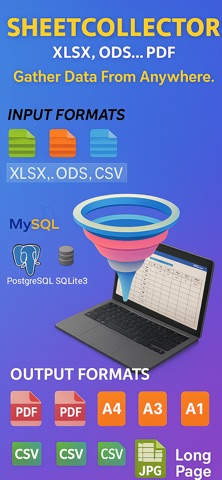
SheetCollector helps you collect tables from real-world sources, refine them locally, and export clean deliverables on Apple devices. Instead of acting like a generic spreadsheet viewer, SheetCollector is built for turning files, image files, and databases into clean PDF, CSV, or JPG outputs. Camera capture and scan intake are available on iPhone and iPad. On Mac, image intake is limited to image files imported from disk. Use it when you need to: • collect tables from CSV, TSV, JSON, XLSX, ODS, HTML, PDF, XML, Markdown, databases, or image files • keep imported data independent from the original source • clean up rows and columns before delivery • export polished PDF, CSV, or JPG outputs while keeping collected data on your device Why SheetCollector is different • Collected data stays on your device after import. • Multi-source intake: import from CSV, TSV, JSON, XLSX, ODS, HTML, PDF, XML, Markdown, SQLite3, MySQL, MariaDB, PostgreSQL, and image files, with camera capture on iPhone and iPad. • Structured editing: add, modify, clear, reorder, and swap rows or columns after import. • Publish-ready export: generate CSV, PDF, or JPG output for sharing, reporting, archiving, or compliance workflows. • Output control: customize page size, orientation, long-page JPG output, borders, headers, footers, fonts, colors, and backgrounds. • Business-ready documents: add logos, private statements, and PDF protection with separate read and edit passwords. Typical workflows • Turn a database table into a client-ready PDF report. • Collect table data from an image file, or use camera scan on iPhone or iPad, then export a cleaner structured output. • Reformat spreadsheets into branded deliverables while keeping collected data on device. • Prepare audit, archive, and documentation outputs on iPhone, iPad, or Mac. Private by design • Data stays on your device • No ads • No tracking Unlocks • Free: unlimited CSV and SQLite3 imports, editing, and viewing with no row or column limits • Subscription: unlock the full workflow • One-time purchase: permanently unlock the features you need Subscription Terms • Payment is charged to your App Store account. • Auto-renews unless turned off at least 24 hours before the current period ends. • Manage subscriptions in App Store settings. • Privacy Policy: https://h53d.github.io/eTable/policy.html • Terms of Use (EULA): https://www.apple.com/legal/internet-services/itunes/dev/stdeula/ Support: danjian42@gmail.com
Latest release
What’s New
This update refreshes the App Store screenshots.
Audience growth
Ratings growth
Baseline captured. Growth appears after the crawler observes a changed rating count.
Momentum comes from crawler snapshots for the tracked storefront. “Viral growth signal” means unusually fast recent rating gains; it is an indicator, not download data.
Price tracking
Price intelligence
First snapshot captured. The trend line starts after the next crawler price observation.
- First observed Aug 8, 2026 · 4:08 PM Free
Screenshots