About this app
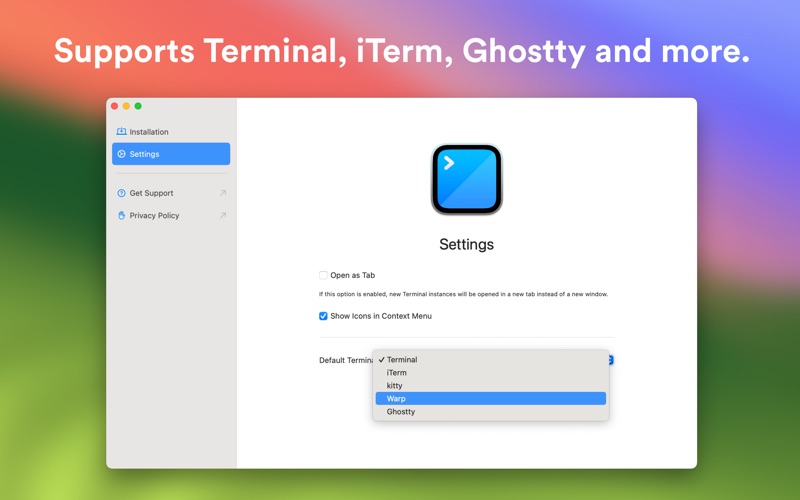
Shellcut lets you open a new Terminal window directly from Finder, with the working directory set to the folder currently displayed in the Finder window. Shellcut supports Apple's Terminal, and third-party terminal apps (listed below). In addition, you can easily copy file paths directly from Finder to your Mac's clipboard. Features: - Open a new terminal window or copy the current file's path by right-clicking inside a Finder window and selecting the app’s context menu option. - Launch a Terminal window or copy the current folder's path using the app’s toolbar button in the Finder’s toolbar. - Configure if new terminal instances should be opened as a new window or in a new tab. - Customize if the context menu shows icons. - Choose if new terminal instances should be opened in Apple's Terminal, iTerm, kitty, Warp, Ghostty, or Prompt. Note: iTerm, kitty, Warp, Ghostty, and Prompt are property by their respective organization below; this app is not affiliated with any of those companies. - iTerm2: https://iterm2.com - kitty: https://sw.kovidgoyal.net/kitty/ - Warp: https://www.warp.dev - Ghostty: https://ghostty.org - Prompt: https://panic.com/prompt/ The app does not have or need to have access to any file or folder. You only need to enable the Finder extension app in the app's introduction process. The main app does not have to run in order to use Shellcut.
Latest release
What’s New
- New: Support for Warp Preview - New: Glyph Style for Context Menu Items
Audience growth
Ratings growth
Baseline captured. Growth appears after the crawler observes a changed rating count.
Momentum comes from crawler snapshots for the tracked storefront. “Viral growth signal” means unusually fast recent rating gains; it is an indicator, not download data.
Price tracking
Price intelligence
First snapshot captured. The trend line starts after the next crawler price observation.
- First observed Aug 12, 2026 · 11:02 PM Free
Screenshots