About this app
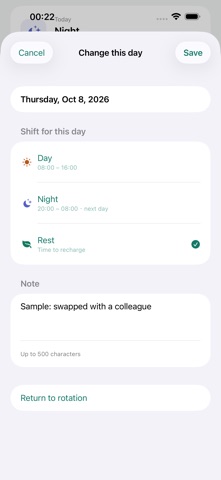
Plan work. Make room for life. ShiftFlow is an offline calendar for repeating work shifts. Build a rotation from your own shifts and see workdays, nights and days off together. BUILD A ROTATION Add shifts in order, such as day, day, night, night, rest, rest. Choose the first date and save. Create up to 20 shift types and rotations of up to 60 days, with an explicit schedule time zone. HANDLE DATE CHANGES Select a date, change its shift and add a note. Return to the rotation when plans change again. Shift times support overnight work. REMIND AND SHARE Enable local reminders for each shift at its start or 15, 30, 60 or 120 minutes before. Share an image of the month's schedule when you need to communicate your plans. STATISTICS AND WIDGETS Review shift counts, work hours, workdays, rest days and unassigned days by month, year or a custom period. No wage calculations. Check your rotation with Home Screen or Lock Screen widgets. KEEP DATA ON YOUR DEVICE No account is required. Shifts and notes stay on your device. Export a complete JSON backup; restoring preserves a copy of the previous file. Includes 10 interface languages, light and dark appearance, larger text and reduced animations. One-time paid download with all built-in features included. No ads, subscriptions or in-app feature purchases. Reminders cover up to 60 upcoming work shifts. Reopen the app to extend coverage. iOS permissions, Focus and system settings can affect delivery. Nonexistent daylight-saving times move to the next valid time. Your entries are personal plans: check your employer's official roster. Export a backup before uninstalling or changing devices.
Latest release
What’s New
New: shift statistics, per-shift reminders, and Home and Lock Screen widgets. The interface now supports 10 languages.
Audience growth
Ratings growth
Baseline captured. Growth appears after the crawler observes a changed rating count.
Momentum comes from crawler snapshots for the tracked storefront. “Viral growth signal” means unusually fast recent rating gains; it is an indicator, not download data.
Price tracking
Price intelligence
First snapshot captured. The trend line starts after the next crawler price observation.
- First observed Oct 16, 2026 · 7:46 PM Free
Screenshots