About this app
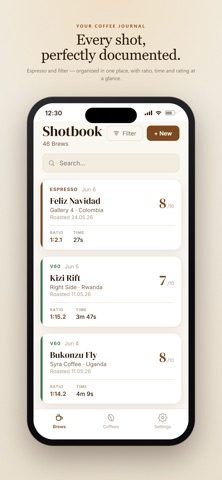
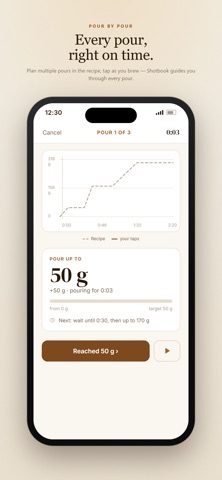
Shotbook is the brew journal for serious home baristas. Espresso or filter: record every brew, brew with a plan, and learn from every result. LOG YOUR BREWS Dose, yield, ratio, time, temperature, grind setting, machine – all in one place. With a built-in timer right at the bench and an automatic ratio readout so you always keep your recipe in check. POUR SEQUENCE FOR FILTER Plan bloom, pours and pauses as a recipe and let the timer guide you step by step: countdown, how much water to pour when, pauses with vibration. Afterwards you see recipe and actual run side by side – and can set your recipe to the real times with one tap. ESPRESSO IN DETAIL Countdown timer with target time, optionally capture pre-infusion and first drop with one tap. Shotbook shows you right away whether you're in ristretto, ideal or lungo territory. GRINDER MEMORY Hand grinder without a display? Shotbook shows you where your grinder was last set when you start the next brew. COFFEE LIBRARY Every coffee at a glance: roaster, origin, variety, process, roast level – built automatically from your brews. With average rating, most frequent aromas and a brew history per coffee. Finished a bag? Mark it as empty. RATING & AROMAS Rate every brew from 1–10 and capture aromas along the SCA Flavor Wheel plus any issues. Spot patterns and know exactly what to change next time. PHOTOS Multiple photos per brew – puck, cup or bag. Snap them straight from the app or add them from your gallery. DARK MODE Fully supported, follows your system settings automatically. PRIVACY All your data stays on your device. No account, no cloud, no tracking. EXPORT Export your brews as JSON – with or without photos – for your own analysis or as a backup.
Latest release
What’s New
New in 1.1.0: - Pour sequence for filter: plan bloom, pours and pauses, brew with a guided timer, compare recipe vs. your taps - Espresso: capture pre-infusion and first drop with one tap - Grinder memory per grinder - Mark a coffee bag as empty - Timer: espresso counts down, filter counts up - New icons, variety, curve on the share card Fixed: photos after iOS updates, decimal comma, export/import with or without photos, many small fixes
Audience growth
Ratings growth
Baseline captured. Growth appears after the crawler observes a changed rating count.
Momentum comes from crawler snapshots for the tracked storefront. “Viral growth signal” means unusually fast recent rating gains; it is an indicator, not download data.
Price tracking
Price intelligence
First snapshot captured. The trend line starts after the next crawler price observation.
- First observed Aug 24, 2026 · 12:21 PM Free
Screenshots