About this app
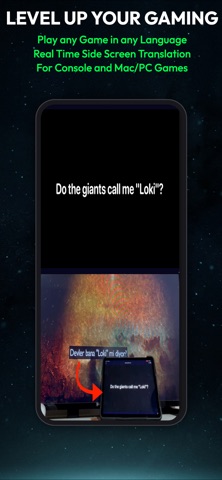
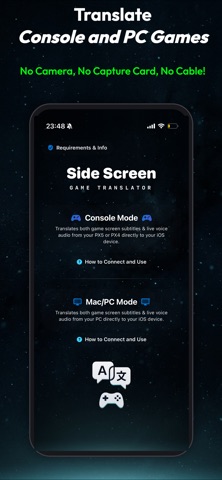
Side Screen: Game Translator - Real-Time Gaming Companion IMPORTANT NOTICE: Exclusively designed as a companion for external hardware (Console PX5 / PX4, Mac, and PC). Does NOT translate native iOS mobile games. Play on your TV or PC while your iOS device acts as a wireless translation display. Play console and PC games in your language in real-time. Side Screen captures game visuals and audio over Wi-Fi, delivering instant translation and live AI voice dubbing without cameras, microphones, or capture cards. Powered by Apple Neural Engine and local AI models, text, speech, and voiceovers are processed on-device with zero cloud latency and complete privacy. NO PAID SUBSCRIPTIONS. NO PAID CREDITS. CORE MODES: - Console Mode (Headless Remote Play) Connect via local network. Side Screen streams game data in the background. Frame subtitles for instant OCR translation, listen to digital audio for speech translation (STT), or hear live voice dubbing (TTS). Camera-free and wireless! - External PC & Mac Mode Connect your computer over Wi-Fi. Side Screen captures screen text (OCR) and system audio (STT) for instant translation and voice dubbing straight to your iPhone or iPad. WHY SIDE SCREEN? - Direct Digital Capture: Video and audio captured over Wi-Fi. No cameras, lighting issues, or background noise. - Triple-Engine Translation: Fast OCR for subtitles, STT for live dialogue, and real-time AI Voice Dubbing (TTS). - On-Device Neural AI Dubbing: In-game dialogue spoken aloud in your language with on-device neural voices. - Context-Aware Engine: Considers previous dialogue lines for accurate translations and character consistency. - Private & On-Device: Game video and audio never leave your device. All OCR, STT, and translation models run locally. (Internet is only used for stream pairing and optional rewarded ads). - No Subscriptions or Paid Credits: No monthly fees. Extra translation time is easily added by watching short rewarded ads. FREQUENTLY ASKED QUESTIONS (FAQ) Q: How do console translations work without a capture card? A: Side Screen acts as a headless Remote Play receiver over Wi-Fi. While you play on your TV, your device displays translations and speaks dialogue aloud. Q: How does real-time voice dubbing work? A: Side Screen converts translated subtitles and dialogue into natural speech using on-device neural TTS models. Q: Do I need to point my camera at the TV? A: No! Direct Wi-Fi capture means lighting and background noise never affect translation. Q: Can I translate PC/Mac games? A: Yes! Connect your computer via Wi-Fi to capture screen text (OCR) or audio (STT) for instant translation and dubbing. Q: Does it translate native iOS mobile games? A: No, Side Screen is exclusively a companion for external hardware (consoles and PCs). Q: Does translation run on-device? A: Yes. All OCR, STT, translation, and voice dubbing run on-device via Apple Neural Engine without cloud servers. Internet is only required for local pairing and loading optional rewarded ads. Q: Why use Neural Engine instead of online cloud APIs? A: Cloud APIs introduce latency, privacy risks, and recurring server costs. Side Screen uses on-device neural processing for instant zero-latency translation with no paid subscriptions, credits, or API keys required. SUPPORTED LANGUAGES: - Text & Speech Translation (18 Languages): English, Spanish, French, German, Italian, Portuguese, Turkish, Russian, Chinese, Japanese, Korean, Arabic, Dutch, Indonesian, Polish, Thai, Ukrainian, Vietnamese. - Live Neural Voice Dubbing (TTS): Turkish, English, Chinese, Arabic, Polish. Note: Requires downloaded Apple language packs for on-device translation. Download Side Screen: Game Translator today and play the world's best games in your language.
Latest release
What’s New
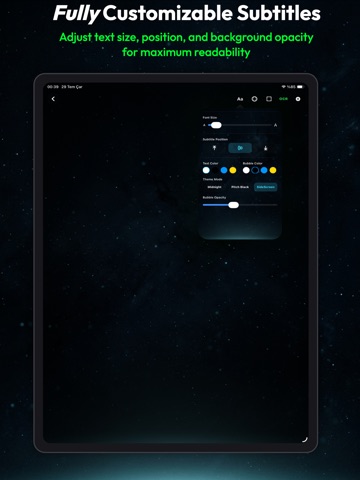
-Bug Fixes -New AI Voice Dubbing (TTS) feature added. --Now you can listen to translated game subtitles and dialogues spoken aloud in real time with natural AI voices. --Available with 100% offline neural voices in Turkish, English, Chinese, Arabic, and Polish. --Customize speech speed, volume, and voice models in Dubbing Settings.
Audience growth
Ratings growth
Baseline captured. Growth appears after the crawler observes a changed rating count.
Momentum comes from crawler snapshots for the tracked storefront. “Viral growth signal” means unusually fast recent rating gains; it is an indicator, not download data.
Price tracking
Price intelligence
First snapshot captured. The trend line starts after the next crawler price observation.
- First observed Sep 4, 2026 · 1:46 AM Free
Screenshots