About this app
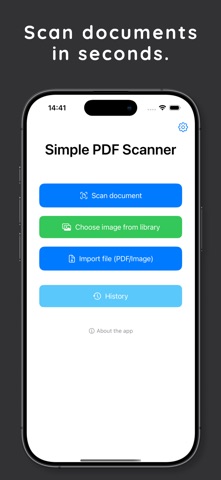
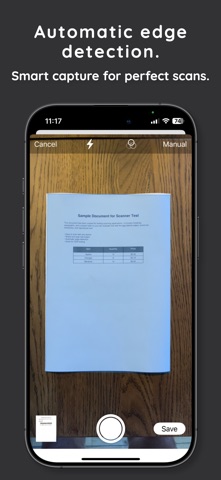
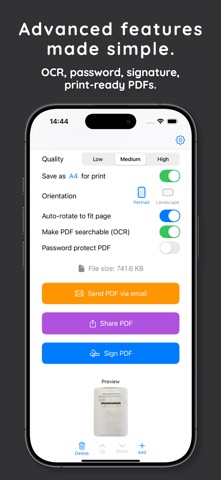
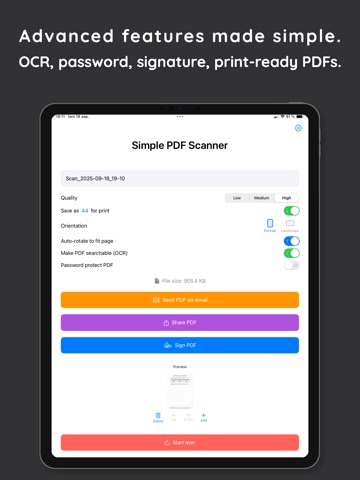
TIRED OF SUBSCRIPTIONS? Most scanner apps lock you into monthly fees and upload your private documents. Simple PDF Scanner App is different: pay once, own it forever – and everything stays securely on your iPhone. FAST, SIMPLE, PRIVATE Turn your iPhone into a high-quality document scanner. Scan receipts, contracts, notes, or business cards and save them as professional PDFs in seconds. FREE FEATURES • Quick scanning of single or multiple pages. • Smart editing: crop, rotate, adjust colors. • Clean PDF creation. • Send PDFs directly via email. GO PRO – ONE-TIME PURCHASE Unlock powerful tools with a single purchase. No subscriptions, no hidden fees. • OCR (text recognition) for searchable PDFs. • Digital signatures: draw or import and place with precision. • Import photos and PDFs (up to 20 pages). • Password protection for sensitive documents. • History: restore your last 10 exports. • A4 and other page sizes (A1, A3, A5). • Share via system share sheet, cloud apps, or messengers. • Custom filenames for better organization. • Multilingual: now in 10 languages (EN, SV, DE, ES, PT-BR, IT, FR, SL, DA, NB). Developed in Sweden by MPK Tec AB. Built to be simple, powerful, and private. Download now and experience scanning without compromises.
Latest release
What’s New
What’s New in Version 1.1 • Digital Signatures (PRO): Draw or import a signature and place it precisely on your document. • Import Files (PRO): Add photos or PDFs (up to 20 pages) directly into your scans. • Organize Pages (PRO): Reorder, add, or delete pages with simple tools. • History (PRO): Restore your last 10 exports with all settings preserved. • More Page Sizes: A4 (free) plus A1, A3, A5 (PRO), with portrait/landscape options. • New Languages: Now available in 10 languages including German, Spanish, French, Portuguese (BR), Italian, Slovenian, Danish, and Norwegian. • Performance: Faster, more stable, and smoother previews. Simple PDF Scanner is now more powerful than ever — with professional features, no subscriptions, and full privacy.
Audience growth
Ratings growth
Baseline captured. Growth appears after the crawler observes a changed rating count.
Momentum comes from crawler snapshots for the tracked storefront. “Viral growth signal” means unusually fast recent rating gains; it is an indicator, not download data.
Price tracking
Price intelligence
First snapshot captured. The trend line starts after the next crawler price observation.
- First observed Sep 9, 2026 · 3:49 AM Free
Screenshots