About this app
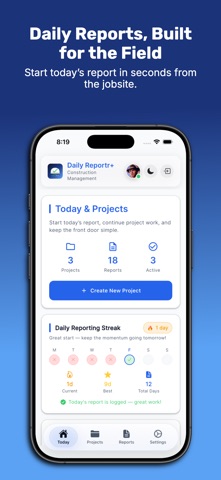
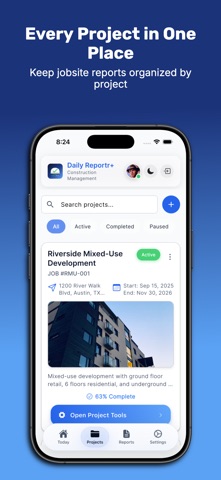
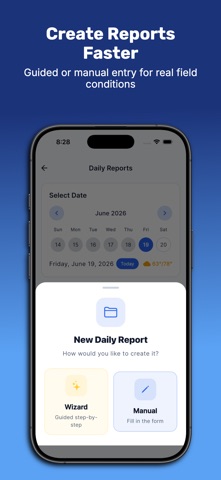
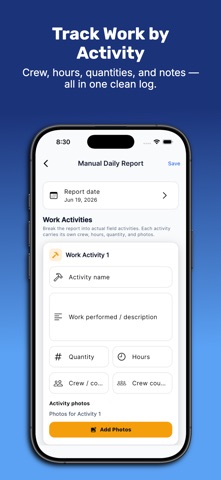
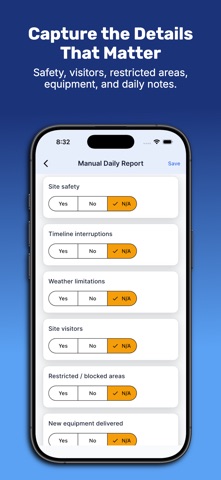
DailyReportr+ is built for construction professionals who need fast, reliable daily reports from the field. Organize reports by project, capture work activities, track crews and hours, document weather and delays, attach jobsite photos, record safety and site observations, collect signatures, and export professional PDF reports ready to share with the team or owner. DailyReportr+ keeps reporting simple at the jobsite and organized back at the office. COMPREHENSIVE PROJECT MANAGEMENT: Create and organize construction projects with job numbers, locations, dates, and status tracking. Monitor progress with duration and timeline visibility. Filter and search projects instantly. EASY PROJECT SETUP: Get started quickly with our step-by-step project wizard. Enter project details, set locations, configure settings, and start documenting in minutes—no training required. POWERFUL DAILY REPORTING: Generate detailed reports using our step-by-step wizard. Capture work activities, hours logged, quantities completed, and descriptions. Associate contractors with activities and track contributions. EQUIPMENT TRACKING: Manage your fleet with 14 equipment types: excavators, bulldozers, cranes, forklifts, drills, generators, compressors, saws, mixers, trucks, trailers, scaffolding, and tools. Track serial numbers, make, model, year. MATERIALS MANAGEMENT: Maintain detailed material inventory with costs, units, and descriptions. Document usage for accurate cost tracking and procurement planning. TASK MANAGEMENT: Complete task system with five priority levels. Categorize as general, safety, quality, maintenance, inspection, or documentation. Assign to team members, set due dates, track estimated vs actual hours. CHECKLIST SYSTEM: Create checklists across eight categories: safety, quality, inspection, maintenance, equipment, environmental, compliance, and general. Track completion, assign to team members, attach notes. SAFETY DOCUMENTATION: Daily safety surveys covering six areas: injuries/hazards, timeline issues, weather stoppages, site visitors, restricted zones, and equipment deliveries. Add descriptions and photos to observations. WEATHER INTEGRATION: Capture weather conditions automatically. View morning, midday, and afternoon forecasts with temperature, conditions, humidity, and wind speed preserved in reports. PHOTO DOCUMENTATION: Attach photos to work activities and safety observations. Photos organized by context with timestamps for accurate record-keeping. PROFESSIONAL PDF REPORTS: Generate polished PDFs with cover page, project header, weather summary, work log tables, notes, safety survey documentation, quality control, and photo gallery with clickable links. Add digital signatures to authenticate reports. DASHBOARD INTELLIGENCE Your reporting health at a glance. Daily Reporting Streak tracks your consistency with current streak, best streak, and total days. Last Report widget shows your most recent entry. Weekly Summary gives a quick view of reports filed this week. Report Coverage Radar flags projects that are falling behind on documentation. OFFLINE-FIRST DESIGN: Work without internet. Data stores locally and syncs automatically when connected. Perfect for remote jobsites with unreliable connectivity. SECURE CLOUD SYNC: Sign in with Apple or Google. Data syncs automatically across all your devices. EASY SIGN-IN: Sign in with Apple or Google—no passwords needed or if you prefer email and password can also work! DESKTOP ACCESS: Access your projects from any computer through our web portal at https://app.dailyreportrplus.com/. Manage reports, review documentation, and collaborate with your team from the office or home. PROJECT NOTES: Document important information, issues, and observations organized by project for easy reference during reviews and audits. Terms of Use: https://dailyreportrplus.com/terms Privacy Policy: https://dailyreportrplus.com/privacy
Latest release
What’s New
NEW: Hourly or Daily Crew Payroll • Choose Hourly or Daily pay for each crew member. • Hourly entries calculate hours and minutes × hourly rate. • Daily entries calculate days × daily rate. • Payroll details and PDF/Excel exports now clearly show pay basis, quantity, rate, and total. • Additional reliability improvements.
Audience growth
Ratings growth
Baseline captured. Growth appears after the crawler observes a changed rating count.
Momentum comes from crawler snapshots for the tracked storefront. “Viral growth signal” means unusually fast recent rating gains; it is an indicator, not download data.
Price tracking
Price intelligence
First snapshot captured. The trend line starts after the next crawler price observation.
- First observed Aug 19, 2026 · 1:32 AM Free
Screenshots