About this app
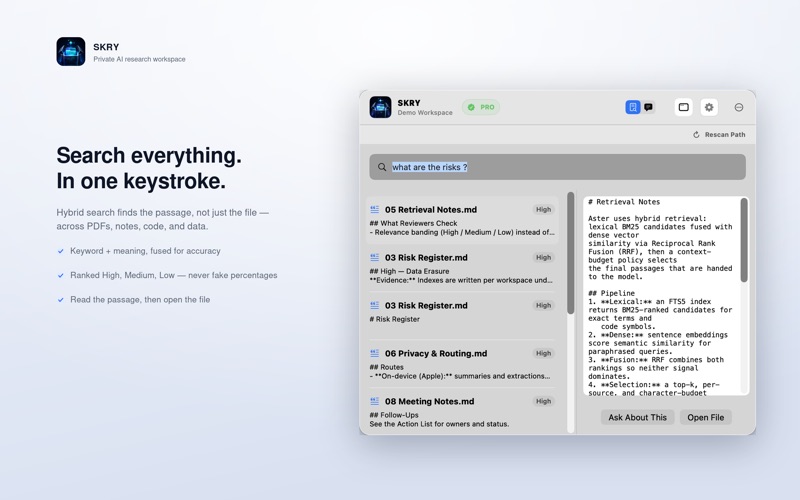
SKRY turns the files and folders you choose into a private, searchable knowledge workspace on your Mac. Search by keyword or meaning. Ask questions about your documents and inspect the source passages used for each response. Create briefings, action lists, risk registers, and reports grounded in your own material. PRIVATE BY DESIGN Your source files and search index stay on your Mac. Use Apple Intelligence on compatible Macs or connect a local Ollama model. If you choose OpenAI or Gemini, SKRY shows what context will be sent and asks for permission first. API keys are stored in Keychain. SEARCH AND ASK WITH EVIDENCE • Search across selected folders and workspaces • Combine direct text matches with semantic retrieval • Ask questions using relevant source context • Open citations and inspect matching passages WORK ACROSS DOCUMENTS AND CODE • Read text, Markdown, PDF, image, JSON, CSV, YAML, Swift, JavaScript, TypeScript, and other common source files • Extract text from scanned PDFs and images with OCR • Summarize documents and explain code • Create cited briefings, actions, risks, and reports • Export analysis as Markdown or PDF BUILT FOR THE MAC SKRY starts in the menu bar for quick access. Open the full workspace whenever you need a larger Search or Ask view, source management, and evidence inspection. START FREE The Free plan supports a focused local workspace with daily Ask and OCR limits. SKRY Pro unlocks unlimited local workspaces, larger indexes, heavier Ask and OCR use, advanced analysis commands, and export workflows. SKRY never deletes your original source files. You control which folders are indexed, which AI provider is active, and whether selected context may leave your Mac. A compatible Mac and enabled Apple Intelligence are required for Apple's on-device model. Ollama, OpenAI, and Gemini availability depends on your own provider setup. Privacy & Eula : https://mehmetsisoglu.com/skry/legal/
Latest release
What’s New
SKRY 2.0 introduces a menu bar-first experience with an optional full workspace, cited Search and Ask, local and cloud AI choices, unified settings, Pro plans, and clearer privacy controls.
Audience growth
Ratings growth
Baseline captured. Growth appears after the crawler observes a changed rating count.
Momentum comes from crawler snapshots for the tracked storefront. “Viral growth signal” means unusually fast recent rating gains; it is an indicator, not download data.
Price tracking
Price intelligence
First snapshot captured. The trend line starts after the next crawler price observation.
- First observed Aug 8, 2026 · 10:11 PM Free
Screenshots