About this app
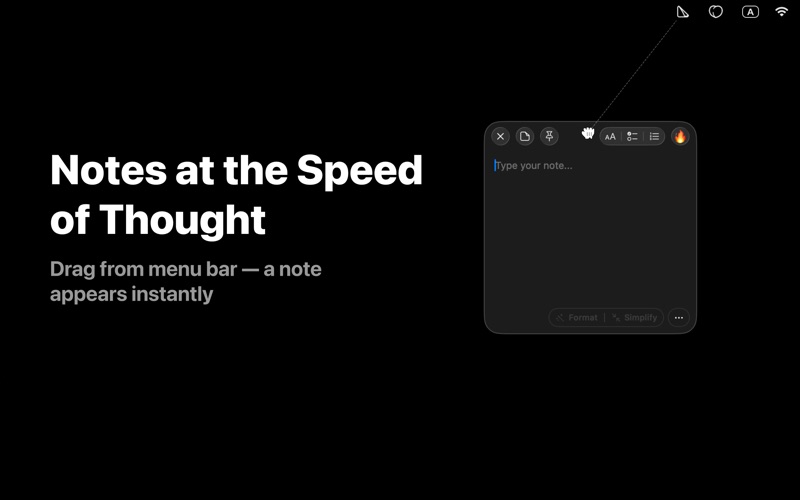
SlashNote — AI-powered sticky notes that live in your menu bar. A notes app with a built-in MCP server — your AI agents can manage your notes in real time. FOUR WAYS TO CREATE A NOTE: • Drag from menu bar — pull the icon down, a note grows under your cursor • Right-click menu — classic approach from the menu bar icon • Voice Note — dictate, AI transcribes 100% on-device • Shake Gesture — shake your mouse while dragging content from any app AI ASSISTANT BUILT IN: • Collapsible AI panel in every note with 6 smart modifiers • Format — add Markdown structure: headings, bold, bullets, code blocks • To-Do List — extract tasks and convert them into checkboxes • Summary — compress your note into 2-5 key bullet points • Translate — translate to any language while preserving formatting • Fix Writing — correct spelling, grammar, and punctuation • Simplify — replace complex language with clearer alternatives MCP SERVER FOR AI AGENTS: • 20 tools: create, read, update, delete, search notes, toggle checkboxes, move/resize windows, schedule tasks • Works with Claude Desktop, Claude Code, Cursor, VS Code, and more • Live UI updates — watch AI edit your notes on screen • HTTP Bridge API on localhost for custom integrations • 6 prompt templates: meeting notes, todo list, weekly review, and more RICH MARKDOWN EDITOR: • 3-state checkboxes: unchecked → in progress → done • Bullet and numbered lists • Headings (H1/H2/H3) with auto-formatting • Code blocks with syntax labels and inline code • Bold, italic, and inline formatting triggers • Copy as Markdown with Cmd+C WINDOW MANAGEMENT: • Pin notes above all windows, even across Spaces • 6 note colors: Yellow, Peach, Green, Blue, Purple, Pink • Tags with color dots or emoji labels PRICING: • Free — up to 3 notes per day, full editor, 6 colors, pin, color & emoji tags, and on-device voice input • Pro — unlimited notes, expanded AI limits, MCP server, shake gesture, Bring Your Own Model, and /note-loop automation • Lifetime — all Pro features with a one-time purchase, yours forever PRIVACY BY DESIGN: • All notes stored locally on your Mac • Voice input processed 100% on-device • AI is optional REQUIREMENTS: • macOS 14.0 or later • Apple Silicon and Intel Mac supported From thought to note in 2 seconds. Download SlashNote and experience sticky notes reimagined with AI. Terms of Use: https://slashnote.app/terms Privacy Policy: https://slashnote.app/privacy Support: support@slashnote.app
Latest release
What’s New
This update includes minor improvements and bug fixes.
Audience growth
Ratings growth
Baseline captured. Growth appears after the crawler observes a changed rating count.
Momentum comes from crawler snapshots for the tracked storefront. “Viral growth signal” means unusually fast recent rating gains; it is an indicator, not download data.
Price tracking
Price intelligence
First snapshot captured. The trend line starts after the next crawler price observation.
- First observed Aug 8, 2026 · 1:33 AM Free
Screenshots