About this app
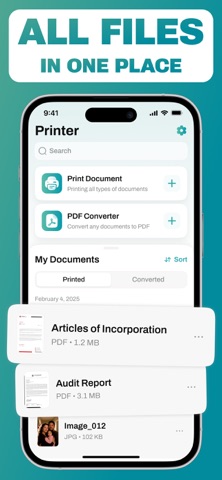
Smart Printer: Scan Print Docs – Your Wireless Printing & Document Solution! Transform your iPhone or iPad into a complete mobile printing and scanning station with Smart Printer: Scan Print Docs. Simply connect to your WiFi printer and handle all your document needs right from your iOS device. Key Features That Simplify Your Life: 1. Instant Wireless Printing: Print documents, photos, emails, and PDFs directly from your device with just a few taps. Whether you need to print boarding passes before a flight, school assignments for your kids, or important work documents, our app makes it effortless. Just connect to the same WiFi network as your printer and you're ready to go. 2.Professional-Quality Scanning: Turn your iPhone camera into a powerful scanner. Capture crisp, clear digital copies of receipts, contracts, notes, or any paper document. 3. Smart File Conversion: Easily convert images (JPEG, PNG) into polished PDF documents perfect for sharing or archiving. 4.Cloud Integration & File Access: Access and print documents directly from iCloud, Google Drive, Dropbox and other cloud services without downloading files first. Your important documents are always available when you need them. Why Choose Smart Printer & Scanner? • No cables or complicated setups required. • Works with most WiFi-enabled printers. • Intuitive interface anyone can use. • Saves time by eliminating computer middlemen. • Perfect for students, professionals, and home use. Download Smart Printer: Scan Print Docs and experience the convenience of mobile printing and scanning done right. Note: Requires WiFi connection between your iOS device and printer. Billing & Subscription Details: Payment will be charged to your iTunes account upon completing your purchase. Your membership automatically renews for your convenience, but you may disable this feature at any time by adjusting your auto-renewal settings in iTunes at least one day before your current subscription period concludes. We process renewal payments approximately 24 hours prior to the end of each billing cycle to ensure uninterrupted service. Please note: If you're taking advantage of a free trial offer, upgrading to a paid subscription will immediately terminate any remaining trial period. Full control is in your hands - you can review, modify, or cancel your subscription at any time through your device's iTunes account settings. Terms and Conditions - https://www.apple.com/legal/internet-services/itunes/dev/stdeula/
Latest release
What’s New
Minor bugs fixed
Audience growth
Ratings growth
Baseline captured. Growth appears after the crawler observes a changed rating count.
Momentum comes from crawler snapshots for the tracked storefront. “Viral growth signal” means unusually fast recent rating gains; it is an indicator, not download data.
Price tracking
Price intelligence
First snapshot captured. The trend line starts after the next crawler price observation.
- First observed Aug 19, 2026 · 11:47 PM Free
Screenshots