About this app
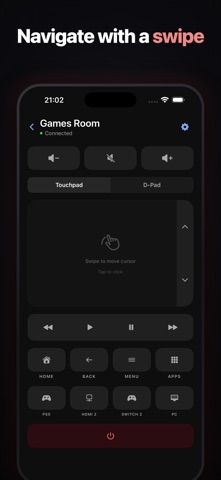
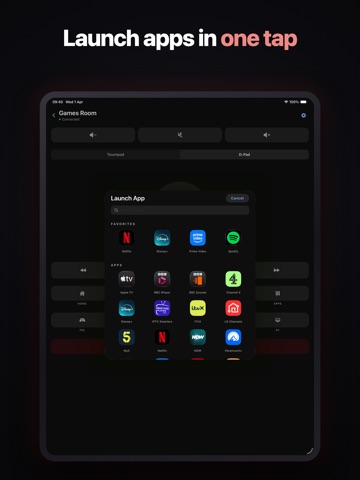
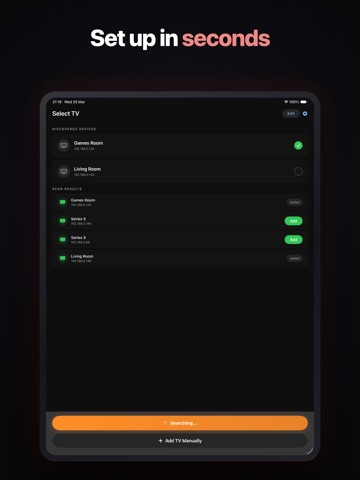
Turn your iPhone, iPad, and Apple Watch into the ultimate TV remote — now for LG webOS, Samsung, Sony Bravia, and Google TV / Android TV. With Live Activities, Dynamic Island support, powerful widgets, and ultra-reliable Wake-on-LAN, controlling your TV has never felt this seamless. Whether you're across the room or anywhere in your home, your TV is always just a tap away. Works With Your TV • LG webOS TVs (2016 and newer) — the full experience: touchpad, Scenes, picture settings, Live Activities, service menu, and more • Sony Bravia TVs — power, volume, inputs, navigation, and media playback; connects instantly with no pairing codes • Samsung TVs — power, volume, inputs, navigation, and media playback; just accept the pairing on the TV • Google TV and Android TV devices (TCL, Philips, Nvidia Shield, Chromecast with Google TV, US Hisense, and more) — power, volume, inputs, navigation, media playback, and app launching Live Activity & Dynamic Island (LG webOS) See what's playing on your TV directly from your Lock Screen and Dynamic Island. Control play/pause, volume, and mute instantly — with app-themed colors for Netflix, YouTube, Disney+, and more. Your TV controls, without even opening the app. Full Apple Watch App Control your TV from your wrist. Includes: • Directional pad navigation • Media playback controls • Power on/off • HDMI input switching Perfect when your phone isn't nearby. Powerful Home Screen Widgets Access your TV controls instantly without opening the app. Widgets let you: • Power on your TV • Adjust volume • Switch HDMI inputs • Launch streaming apps (LG and Google TV) • Control playback Available in multiple sizes and fully integrated with Wake-on-LAN. Scenes (LG webOS) Save picture mode, sound output, and input as a one-tap preset. Movie night, gaming, daytime TV — set the whole TV up in a single tap from the app, widgets, or Shortcuts. Automatic TV Discovery Find the TVs on your network with a single tap. The app automatically detects your TV's name, IP address, and MAC addresses — no manual configuration required. Customizable Remote Layout Build your ideal remote. Rearrange, show, or hide: • Volume slider • Volume buttons • Media controls • Navigation controls • And more Give every TV its own layout — or share one default across them all. The editor only offers controls your TV actually supports, and layouts are independent on iPhone and Apple Watch. TV Self-Test Not sure everything's working? Run a live command sweep that proves what your TV responds to and produces a shareable report — perfect for diagnosing tricky network setups. Configuration Import & Export Back up or transfer your TV configurations between devices with ease. Service Menu Access (LG webOS) Access the TV service menu and number pad for hotel mode and advanced settings when needed. Multiple TV Support Easily switch between different TVs in your home — even different brands. Each TV maintains its own connection and settings for effortless multi-room control. Built for Reliability • Improved auto-reconnect after background idle • Enhanced Live Activity state tracking • More stable watch command handling • Continuous performance improvements Pay once for Pro — no subscriptions, no ads. Experience the convenience of complete TV control — through the full app, widgets, Live Activities, or right from your wrist. No more searching for the remote.
Latest release
What’s New
Smart Remote+ now controls Hisense and Toshiba VIDAA TVs, joining LG webOS, Samsung, Sony Bravia, and Google TV / Android TV. Hisense and Toshiba VIDAA TVs The Hisense sets sold outside the US run VIDAA, and the app had no way in to them until now. Enter the four-digit code your TV puts on screen and you get power, volume including the slider and mute, the full D-pad, transport, colour and number keys, and direct input switching. Your inputs and your apps come from the TV itself, so the input row shows the names you gave them and the launcher shows what is actually installed — not a generic list. Launching works straight from the app, and from your widgets and Shortcuts. Screen Sleep Turn the TV's screen off with the sound still playing, for falling asleep to a programme or listening to a music channel without the panel lit. Off Now and Wake buttons live in the app, on the Mac menu bar, on Apple Watch, in the Controls widget and in Control Centre. Turn TV Screen Off and Turn TV Screen On are also Shortcuts actions, so you can schedule them: "at 23:00, turn the TV screen off" runs whether or not the app is open. LG and Sony TVs. Switch the section on in Settings, Customise Layout. Also fixed Turning the screen off now works on LG TVs, where on most firmware it previously did nothing at all. On Sony TVs, a scheduled or widget screen-off can no longer switch the picture back on when it is already off. And a TV that answers in standby is no longer reported as disconnected after you turn it off, so the next press has something to send on.
Audience growth
Ratings growth
Momentum comes from crawler snapshots for the tracked storefront. “Viral growth signal” means unusually fast recent rating gains; it is an indicator, not download data.
Price tracking
Price intelligence
First snapshot captured. The trend line starts after the next crawler price observation.
- First observed Aug 13, 2026 · 3:23 PM Free
Screenshots