About this app
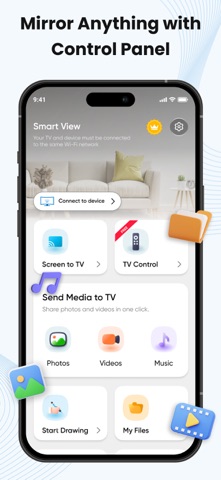
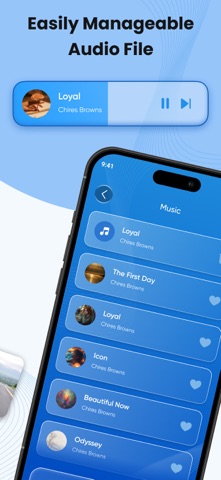
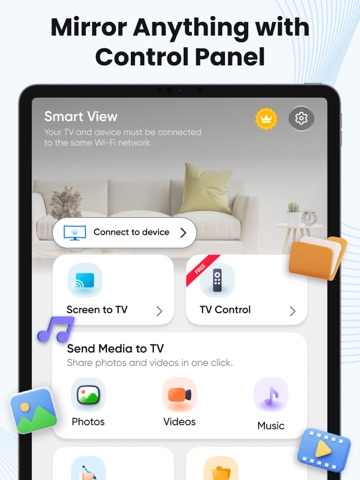
Smart View App Lets you enjoy multimedia content from your mobile and PC on your Smart TV as well as letting you control the Smart TV with your mobile. With Smart View you can easy to watch your favorite content on your TV. Play content from your mobile TV Assist, easy to connect your mobile to the TV and select videos, pictures, or even music. Your content will instantly play on the Smart View TV Cast. Create Playlists Create personalized playlists to access all of your favorite videos, photos, and music in one place. Play content from your PC Add content files or even a whole folder from your PC into Smart View, and play everything on the list in one go! Features • Smart Things Smart View App • Mirror Smart View, Allshare, Allcast • Phone screen on a large smart TV • Support for all media files, pictures, videos, etc. • Cast media files and mirror screen to TV and Windows • Screen Mirroring - Smart Share - TV • Cast photos, music & videos to Chromecast • Cast To TV: Screen Mirroring for Smart TV • Control your Remote, Smart Remote • Watch your movies on Chromecast TV • Easy to connect from the Smart Share App How to use Mirroring 1. Make sure your phone/tablet and smart TV are connected to the same Wi-Fi network. 2. Enable “Wireless display” on your phone. 3. Enable “Miracast” on your smart TV. 4. Search and pair the device. SmartThings With Smart View, you can cast your photos on your TV. Easy cast music from your Chromecast app to your Smart TV. Cast your camera video to your TV screen! Smart share app for all smart TVs. Stream the phone's camera to Chromecast. Smart Things Smart View app is the best smart view app. By using the SmartThings app, Smart View is a free screen mirroring, with Castto you can broadcast any files to your Smart TV. With SmartShare you can make screen mirroring of any photos, video files, audio, and other content to your Smart TV in real-time and without any delay. Smart View Smart TV enables you to cast images, videos, and music to all TV or other DLNA Devices. With a smart TV cast, you can stream any content to your device. Smart Share is a screen casting that allows you to easily open any media on the big screen, including mobile games, photos, music, videos, and e-books. With TV Cast you can control what you watch on your TV without interrupting the playback. Smart View's interface is pretty simple, designed so you never lose sight of whatever you're watching at that moment. All you have to do is connect your TV and smart device to the same network. After that, you're ready to start controlling playback. All Screen Mirroring App smart view TV screen mirroring assistant for screencasting, Cast Phone to TV with Wi-Fi. Smart Share is the perfect casting app for all smart TVs without Wi-Fi just by using dongles or adaptors. SmartShare provides phone to TV, cast To TV, and TV mirror, all connected with the smart cast. Smart View Screen Mirroring - use the Costo feature from supported applications. Smart View Free App is able to play games and videos with a screen mirror. Smart View - Cast Phone to TV based on Miracast TV mirror technology is your best choice! Read our full Terms of Service and our Privacy Policy at: Privacy Policy https://smart-view.netlify.app/ Terms of use https://smart-view.netlify.app/terms EULA https://smart-view.netlify.app/eula
Latest release
What’s New
Your screen mirroring experience just got better. - New: TV Remote - Faster screen casting performance - Improved interface - Stability improvements and bug fixes
Audience growth
Ratings growth
Baseline captured. Growth appears after the crawler observes a changed rating count.
Momentum comes from crawler snapshots for the tracked storefront. “Viral growth signal” means unusually fast recent rating gains; it is an indicator, not download data.
Price tracking
Price intelligence
First snapshot captured. The trend line starts after the next crawler price observation.
- First observed Sep 2, 2026 · 7:05 AM Free
Screenshots