About this app
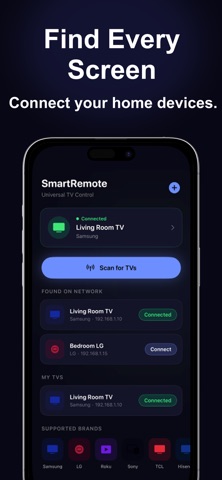
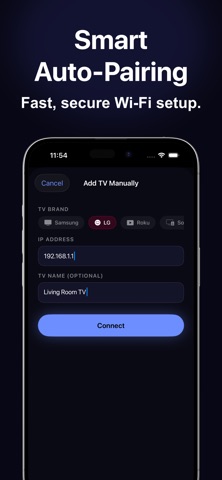
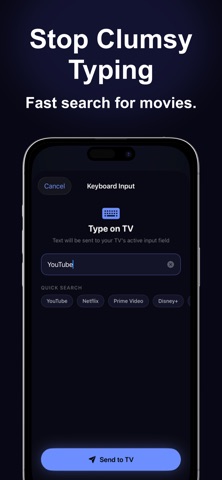
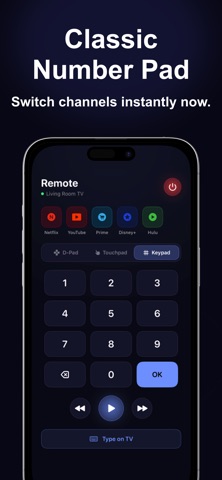
Turn your iPhone into the only remote you will ever need. SmartRemote connects to your Smart TV over Wi-Fi and gives you full control - no batteries, no line-of-sight, no lost remote. The app automatically scans your home network and finds compatible TVs in seconds. COMPATIBLE TV BRANDS > Wi-Fi Smart TVs using WebSocket protocol (2016 and later models) > Wi-Fi Smart TVs using webOS (LG Smart TVs) > Roku OS televisions including models by TCL, Hisense, Sharp, Insignia, and ONN > Sony Bravia televisions (2013 and later models) > Vizio SmartCast televisions Note: TVs must be connected to the same Wi-Fi network as your iPhone. IR-only televisions are not supported. REMOTE CONTROL MODES Three control modes let you choose how you navigate: D-Pad Mode - A classic directional ring with Up, Down, Left, Right, and OK in the center. Includes volume, mute, home, back, menu, and source buttons. Touchpad Mode - Swipe your finger to move the cursor on screen. Tap to select. Designed for gesture-based navigation. Number Keypad - A full 0-9 keypad for channel entry with a large OK button. KEY FEATURES > Automatic TV discovery - scans your Wi-Fi network and finds compatible TVs instantly > Manual add - enter an IP address to connect to any supported TV directly > One-tap app launch - open streaming apps with a single tap > Keyboard input - type on your iPhone and it appears on the TV > Multi-TV support - save and switch between multiple TVs > App shortcuts - launch streaming services directly > Volume and mute controls mapped per TV brand > Power control for supported TVs > Auto-reconnect if connection drops > Secure pairing - data stored locally only> PRIVACY SmartRemote requires no account and collects no personal data. All communication stays on your local Wi-Fi network. REMOVE ADS SmartRemote is free to download. A one-time in-app purchase removes all ads permanently. This is a non-recurring purchase. REQUIREMENTS > iPhone running iOS 16.0 or later > Same Wi-Fi network for iPhone and TV > TV must be powered on Privacy Policy: https://sites.google.com/view/tvremoteconfiguration/home Terms of Use: https://www.apple.com/legal/internet-services/itunes/dev/stdeula/
Latest release
What’s New
Optimized features for a faster and more reliable experience
Audience growth
Ratings growth
Baseline captured. Growth appears after the crawler observes a changed rating count.
Momentum comes from crawler snapshots for the tracked storefront. “Viral growth signal” means unusually fast recent rating gains; it is an indicator, not download data.
Price tracking
Price intelligence
First snapshot captured. The trend line starts after the next crawler price observation.
- First observed Aug 23, 2026 · 1:23 PM Free
Screenshots