About this app
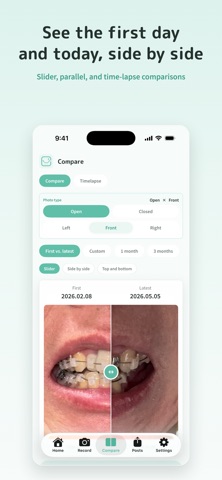
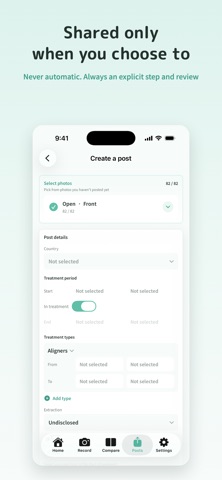
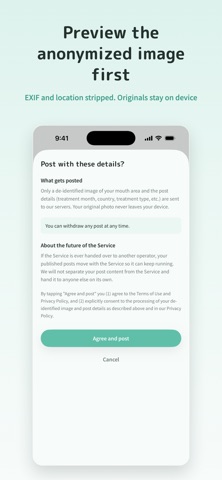
SmileProgress lets you record and organize photos of your orthodontic journey entirely on your device. Capture, align, anonymize, and compare in one flow — and share anonymously only when you choose to. It is an app for keeping your own record, at your own pace. Main features - Record from the same angle: organize open / closed × front / right / left photos by date - Auto-align: detects the mouth area and matches level, center, and size so Before / After are easy to compare - Easy comparison: pick first vs. latest, 1 month ago, or 3 months ago, and view with a slider, side by side, or time-lapse - Anonymization preview: check the shared image beforehand; EXIF and location data are removed - Sharing you control: sharing always goes through an explicit action and a confirmation screen, so nothing is ever posted automatically - Delete anytime: you can take down a shared post whenever you want Privacy - Original photos are kept only on your device and are never sent to our servers - Only anonymized, adjusted images are used when you share - Whether to share is entirely your choice SmileProgress is not a medical device and is not intended for diagnosis or treatment. It is an app for recording and looking back. Pricing - Browsing posts and sharing anonymously are free - Recording photos is free for 90 days from the day you add your first photo - After that, viewing, comparing, exporting, backing up and sharing what you have already recorded stays free - The one-time purchase is needed only to keep adding new photos Features unlocked by the one-time purchase stay available for good. We plan to add a Pro plan (extra features) in the future, but we will never move one-time features behind a paid plan. Early buyers will receive a benefit when Pro launches.
Latest release
What’s New
Sharing anonymously is now free. You can create a post, add photos, edit the details and delete it without the one-time purchase. Recording photos is free for 90 days from the day you add your first photo. After that, viewing, comparing, exporting, backing up and sharing what you have already recorded stays free. The one-time purchase is needed only to keep adding new photos. If you were already using the app, there is no time limit. You can keep adding photos as before. Other changes - Reworked how photos are levelled. Front shots now use the line between both eyes, and left/right profiles use the line from the visible eye to the nose, so the tilt of your mouth varies less on profile shots - Mouth detection is more reliable on profile shots where the mouth appears narrow - On the Compare tab, you can now scroll the page by swiping over the comparison card
Audience growth
Ratings growth
Baseline captured. Growth appears after the crawler observes a changed rating count.
Momentum comes from crawler snapshots for the tracked storefront. “Viral growth signal” means unusually fast recent rating gains; it is an indicator, not download data.
Price tracking
Price intelligence
First snapshot captured. The trend line starts after the next crawler price observation.
- First observed Aug 21, 2026 · 2:58 PM Free
Screenshots