About this app
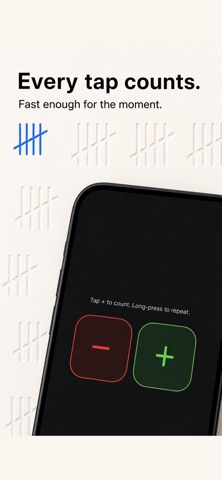
Two people counting the same thing usually end up with two different numbers. SnapCount keeps everyone on the same count, in real time. You and your team open the same counter on different phones. Every tap shows up on every screen the same second. The number on your device is the number on everyone else's device. No reconciling at the end of the night. Built for the places counting actually happens, which is rarely a quiet desk. Restaurant inventory. Event door capacity. Yoga studio attendance. Pitch count at the dugout. Knitting rows. Wine cases and loose bottles. Church services across three entrances. Anywhere a hand and a noisy room are the only tools you have. THE COUNTER ITSELF Big buttons. The plus and minus targets are 96 by 96 points, larger than Apple's own recommended size, because we counted things on a real loading dock and small buttons made us miss. Set a goal and watch the bar fill as you tap. A haptic confirms when you hit it. Step the counter by 5 if you are counting cases instead of bottles. Live sync. Open the same counter on three iPhones and the number stays the same on every screen. Lose connection mid-shift and the count catches up the moment you reconnect. Counter groups. If you are tracking five things at once, group them. Tap the group and see every total on one screen. TEMPLATES Pre-built counter sessions for the awkward stuff. Wine Inventory for cases and loose bottles. Pitch Count for balls, strikes, and fouls. Church Attendance across multiple entrances. Event Door Capacity for venues. Knitting Row Counter for craft projects. Plus prayer and meditation, inventory, traffic study, baby feeding, and a blank Start From Scratch when none of those fit. GUEST SESSIONS For when you do not need an account. Spin one up in two seconds, share a six-character code with a coworker, both of you start tapping. No signup required. Free guest sessions stay live for 15 minutes; paid plans extend that to 24 hours. PLANS A free trial to start. Team is for up to five people sharing counters in one organization. Enterprise opens it to unlimited members and adds counter locking, full activity logs, and detailed CSV exports with timestamps for every tap. CSV export when the counting is done. Send the file to whoever needs the numbers. ACCESSIBILITY The app respects Reduce Motion and Reduce Transparency. VoiceOver reads counters as live regions, so your screen reader announces the new total the second it changes. Dynamic Type works up to accessibility sizes without breaking layout. Dark mode is the same quality as light, not an afterthought. No ads. No third-party tracking. Subscriptions are billed through Apple and cancellable from your iPhone Settings. If you have been using a thumb clicker, a notes app, or yelling a number across the room, SnapCount is the version that does not fall apart when more than one person is counting. TERMS OF USE https://www.apple.com/legal/internet-services/itunes/dev/stdeula/
Latest release
What’s New
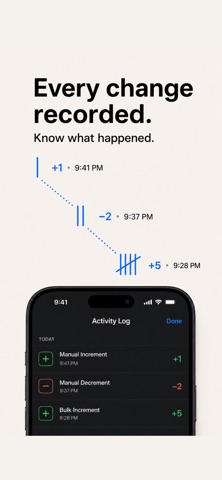
Two people counting the same thing can easily finish with two different numbers. SnapCount keeps everyone working from one shared count. With Team or Enterprise, your crew can open the same saved counter on different phones. Changes appear across connected screens in real time, so there is no need to reconcile separate totals at the end of a shift. SnapCount is built for the places where counting actually happens: restaurant inventory, event capacity, studio attendance, pitch tracking, knitting projects, warehouse stocktakes, community events and more. THE COUNTER Large, thumb-friendly plus and minus controls make it easy to count quickly, even in busy environments. Set a goal and watch the progress bar fill as you count. SnapCount provides haptic feedback when the goal is reached, and feedback can be turned off in Settings. Configure increment and decrement steps when you need to count by cases, packs or groups instead of individual items. Group related counters together, add the first counter from a clear starting action, and review every total from one screen. Use the same familiar list controls whether a counter is on the main screen or inside a group. Two-letter initials help teams identify counter creators and organization members while keeping account identity consistent across the app. Paid team counters support real-time synchronization. If the connection drops, SnapCount keeps saved-counter taps in an on-device queue and syncs them in order when the network returns. Idempotent requests prevent a retried tap from being counted twice. TEMPLATES Start quickly with reusable counter setups designed for real workflows: Wine Inventory by category Pitch Count Tracker for strikes, balls, fouls and hit batters Church Attendance for adults, children and volunteers Multi-Door Capacity for venue entries and exits Knitting Rows & Stitches Prayer & Meditation Traffic Study Baby Feeding & Diaper Log Inventory Audit Start From Scratch Some templates require Team or Enterprise. The required plan and App Store price are shown before purchase. GUEST SESSIONS Need to count together without creating accounts? Start a guest session, share its six-character code and begin counting with a coworker. Free guest sessions remain available for 15 minutes. Paid plans extend guest sessions to 24 hours. PUBLIC VIEWS Create a read-only public link for a counter or counter group. Anyone with the link can follow current totals without signing in or gaining access to counting controls. Public Views stay available until an organization admin revokes them. They work well for venue displays, team scoreboards, inventory checks, and remote progress updates. PLANS Every new organization starts with a free 7-day trial. The trial does not charge automatically. Plans offered to new customers are one-time purchases through Apple: Team supports one organization, up to five members, real-time synchronization and spreadsheet export. Enterprise adds unlimited members, analytics, activity history, timestamped exports, scheduled reports, automatic resets, counter access controls and counter locking. Each purchase unlocks one organization. Current localized prices are shown in Plan & billing before purchase. Purchases do not renew. SnapCount does not issue App Store refunds directly. Apple determines refund eligibility under its policies and applicable law. Existing legacy subscribers keep their current Apple subscriptions and can manage or cancel them through their iPhone subscription settings. ACCESSIBILITY SnapCount supports VoiceOver, Dynamic Type, Reduce Motion and Reduce Transparency. Counter totals use accessibility live regions so VoiceOver can announce count changes. Light and dark appearances are fully supported.
Audience growth
Ratings growth
Baseline captured. Growth appears after the crawler observes a changed rating count.
Momentum comes from crawler snapshots for the tracked storefront. “Viral growth signal” means unusually fast recent rating gains; it is an indicator, not download data.
Price tracking
Price intelligence
First snapshot captured. The trend line starts after the next crawler price observation.
- First observed Aug 26, 2026 · 5:44 PM Free
Screenshots