About this app
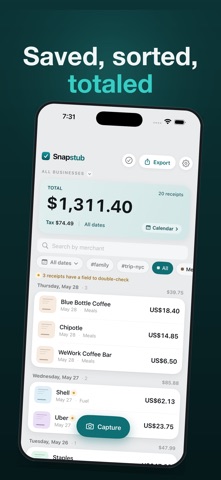
Snapstub is a receipt scanner for people who keep their own books and don't want another subscription. It reads a receipt on your iPhone, turns it into a clean row — merchant, date, total, tax, category — and exports the lot as a spreadsheet your accounting software will actually import. No account. No cloud. No monthly fee. WHAT IT COSTS Scanning, organizing and backup are free and unlimited, forever. A single $9.99 purchase unlocks getting your data out as a file. That is the only payment there is — no subscription, no second charge, and nothing you already saved is ever held hostage. HOW IT WORKS Point the camera. Snapstub finds the receipt's edges, straightens it, and reads it using Apple's on-device text recognition. Back comes the merchant, date, total, tax, tip and a suggested category. When a field is uncertain it says so and asks you to confirm, instead of quietly guessing wrong. Scanning a stack keeps you on the camera, with a running count of what is waiting. Receipts also arrive from Photos, from a screenshot, or from an emailed PDF. WHEN TAX TIME COMES Pick who the export is for and Snapstub shapes the CSV to match — QuickBooks, Xero, Wave, FreshBooks or Zoho Books. The right columns in the right order, so the import works the first time. Or produce a PDF expense report with receipt thumbnails, showing subtotal before tax, tax, and total. IF YOU RUN TWO BUSINESSES Assign each receipt to a business, and both the list and the export scope to it — so one company's receipts never land in the other's books. IF YOU FILE IN QUÉBEC The PDF report can split TPS and TVQ instead of showing a single merged tax line. WHAT'S FREE • Unlimited scanning — no cap, no trial clock • On-device recognition, edge detection and deskew • Categories (including your own), labels, tips and notes • Calendar view from a whole year down to a single day, with running totals • Sort by "Recently scanned" to find what you just captured, even if its printed date was misread • Filter to just the receipts Snapstub was unsure about, and clear them one by one • Full backup and restore — never behind the paywall WHAT THE ONE-TIME UNLOCK ADDS • CSV export, shaped for your accounting package • PDF expense report with receipt thumbnails • Bulk export, share and delete • Quick Share — send a batch to another iPhone by QR code, no file and no cloud WHAT IT DOESN'T DO It does not connect to your bank and cannot import card transactions. It does not file your taxes. It is not a cashback or rewards app. There is no web dashboard and no team features — this is a tool for one person keeping their own records. It is not affiliated with QuickBooks, Xero, Wave, FreshBooks or Zoho Books; it writes a file those programs import. PRIVATE BY DESIGN Snapstub collects nothing. No analytics, no trackers, and no networking beyond Apple's StoreKit for the one-time purchase. Everything works offline. The App Store privacy label reads "Data Not Collected" — the only honest answer. Built solo, for people who own their data.
Latest release
What’s New
Find the receipt you're looking for. • The "needs a double-check" banner is now a button. Tap it to see just those receipts, fix them, and it tells you when there's nothing left. It used to only show a number. • New "Recently scanned" sort. When a receipt's printed date is read wrong it files itself somewhere you'd never look — now you can order the list by when you actually scanned it, and it's right at the top. • Every receipt keeps a record of when it was captured, shown when you open it. Receipts from before this update recover theirs from the saved photo where possible. • Sort moved next to the search box, so the filter row stays filters.
Audience growth
Ratings growth
Baseline captured. Growth appears after the crawler observes a changed rating count.
Momentum comes from crawler snapshots for the tracked storefront. “Viral growth signal” means unusually fast recent rating gains; it is an indicator, not download data.
Price tracking
Price intelligence
First snapshot captured. The trend line starts after the next crawler price observation.
- First observed Sep 4, 2026 · 7:53 AM Free
Screenshots