About this app
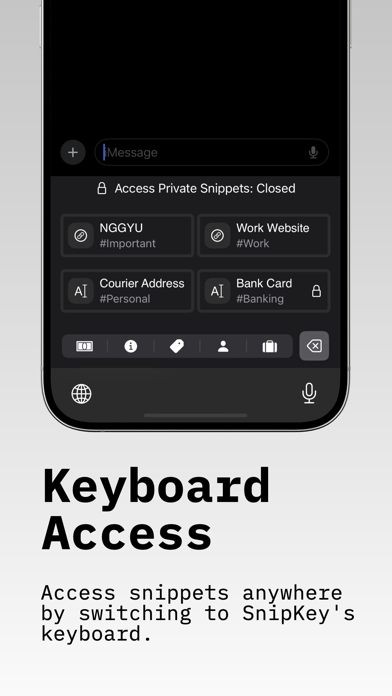
Introducing SnipKey, the simple and modern solution for managing text snippets and images, complete with a sleek custom keyboard extension. SnipKey seamlessly integrates into your digital workflow, revolutionizing how you interact with content across all your apps—from personal reminders to sensitive work information. SnipKey is a Keyboard Extension. Why SnipKey Stands Out? - Simple & Modern Design Intuitive interface that's a joy to use Clean, minimalist aesthetics for distraction-free productivity - Effortless Management Easily create, store, and categorize snippets and images Custom tags for quick retrieval and organization - Smart Keyboard Extension Access snippets instantly in any app Seamlessly switch to SnipKey without leaving your current task - Advanced Filtering Find exactly what you need with tag-based filtering Categorize snippets by type (Personal, Work, Banking) or custom tags - Enhanced Security Protect sensitive data with robust encryption Secure snippets with FaceID or TouchID for privacy - Universal Compatibility Works flawlessly across your favorite apps Access snippets wherever you are, whenever you need them SnipKey isn't just a snippet manager—it's a comprehensive, modern solution designed to enhance your productivity and simplify your digital life. With its sleek interface and powerful features, SnipKey transforms how you handle information. Learn more at https://snipkey.jrtv.online Terms of Service: https://snipkey.jrtv.online/terms-conditions Privacy Policy: https://snipkey.jrtv.online/privacy-policy EULA: https://www.apple.com/legal/internet-services/itunes/dev/stdeula/
Latest release
What’s New
- Full QWERTY Keyboard: Complete keyboard with letters, numbers, symbols, and instant snippet access. Type naturally without switching apps. (Experimental) - Slash Commands: Type / + snippet name for instant autocomplete—just like Slack or Notion. Smart fuzzy search finds matches as you type. - Open Source: View the code on GitHub. Transparent, privacy-first development. - Smart Keyboard Features: Auto-capitalization, smart punctuation, and biometric security for secure snippets. - Enhanced Performance: Faster keyboard response, lower memory usage, smoother typing experience. - Bug Fixes: Improved stability and iCloud sync reliability.
Audience growth
Ratings growth
Baseline captured. Growth appears after the crawler observes a changed rating count.
Momentum comes from crawler snapshots for the tracked storefront. “Viral growth signal” means unusually fast recent rating gains; it is an indicator, not download data.
Price tracking
Price intelligence
First snapshot captured. The trend line starts after the next crawler price observation.
- First observed Aug 24, 2026 · 11:47 AM Free
Screenshots