About this app
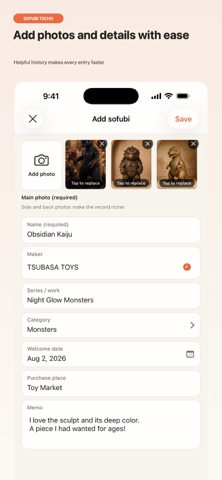
Sofubi Journal is an iPhone app for collectors who want to record their favorite sofubi with photos at the center. Photograph each piece and save its name, maker, series, category, date added to your collection, place of purchase, and notes. With an experience designed around browsing photos, you can revisit your collection and memories at any time. 【A Photo-First Collection】 ・Manage your sofubi in a photo-focused gallery ・Filter by favorites or categories ・Save multiple photos from different angles ・Tap a photo to view it at a larger size ・Reuse previously entered makers and purchase locations when adding new items 【Turn Your Memories into a Diary】 Record the day a sofubi joined your collection, an event you attended, a new display arrangement, or any other memorable moment with photos and text. Link related sofubi to each entry to connect your collection with its history. 【Organize It Your Way】 Add, rename, and reorder tags. Even as your collection grows, you can organize it using a system that suits you. 【Keep Your Records in Your Hands】 Export your collection, diary entries, and photos into a single backup file. Save it wherever you prefer, including iCloud Drive or On My iPhone, and restore your data from the file whenever needed. Backup and restore are available in the free version. 【Free Version】 ・Up to 30 sofubi ・Up to 30 diary entries ・One main photo per sofubi ・Tag management ・Backup and restore 【Sofubi Journal Premium】 A one-time purchase. Pay once and use it forever. ・Unlimited sofubi records ・Unlimited diary entries ・Up to nine photos per sofubi ・Monthly and yearly collection recaps The purchase confirmation screen displays the current price configured in the App Store. There are no auto-renewing subscriptions or additional monthly fees. No ads. No account required. Your photos and records are stored on your device and are not sent to the developer's servers.
Latest release
What’s New
• Added three- and four-tier open racks. • Added rack material switching. • You can now tap a sofubi in the adjustment preview to switch the item being adjusted.
Audience growth
Ratings growth
Baseline captured. Growth appears after the crawler observes a changed rating count.
Momentum comes from crawler snapshots for the tracked storefront. “Viral growth signal” means unusually fast recent rating gains; it is an indicator, not download data.
Price tracking
Price intelligence
First snapshot captured. The trend line starts after the next crawler price observation.
- First observed Sep 4, 2026 · 5:07 AM Free
Screenshots