About this app
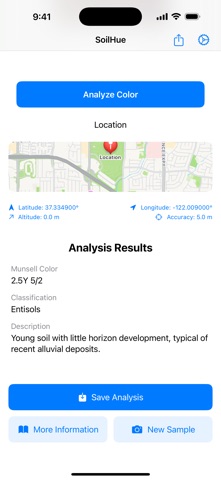
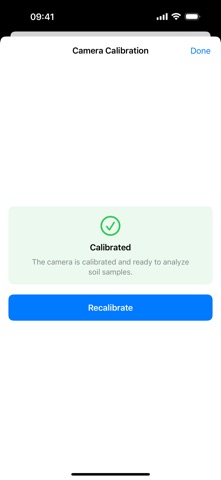
SoilHue identifies the Munsell color of a soil sample from a photograph taken with your device. It is built for pedologists, agronomists, geologists, archaeologists, conservators, soil-science students and anyone who works with soil color in the field. WHAT IT DOES • Calibrate the camera with an X-Rite ColorChecker Classic. SoilHue detects the card automatically inside your photo, rectifies its perspective, and computes a 3×3 correction matrix by least-squares fit over the 24 reference patches. • Take a photo of your soil sample (or pick one from your library) and select the area to analyze with a rectangle or a free-form polygon. • SoilHue averages the selected pixels in linear sRGB, applies your calibration matrix, and finds the closest match in CIE Lab among 293 chips derived from the official USDA Munsell renotation data. • Get the Munsell notation, an approximate USDA soil order (Histosol, Mollisol, Alfisol, Oxisol, Vertisol, Spodosol, Aridisol, Entisol, Inceptisol, Ultisol) and a short description. WHAT'S NEW IN 2.0 • 293 reference chips instead of 18. • ΔE94 in CIE Lab instead of Euclidean RGB. • Matrix 3×3 calibration replacing per-channel factors. • Automatic ColorChecker detection (Vision framework). • Printable calibration card (2-page A4 PDF, ICC sRGB). • Lighting check (warm/cool/atypical tint warning). • Real .xlsx export. • Accessibility, dark mode and stability improvements. DATA & PRIVACY • All analysis runs on-device. No image, sample or location ever leaves your phone. • Samples are stored locally in your app sandbox. iCloud sync is planned for a future release. • Location is captured only when you explicitly grant it. REQUIREMENTS • iPhone or iPad running iOS 17.6 or later. • A reasonably calibrated camera. Recommended: X-Rite ColorChecker Classic for best results. A basic calibration card is included for casual use. NOTES The USDA soil order classification is a heuristic orientation, not a definitive diagnosis — real classification depends on horizon, chemistry, texture and other field properties. Calibrations saved with versions before 2.0 are not compatible with the new color engine; the app will ask you to recalibrate. Contact: soilhue@ajgb.eu — Web: ajgb.eu/apps/soilhue
Latest release
What’s New
Camera permission fixes: clearer error messages and a direct Settings button. Change permissions, return to the app, and it automatically retries
Audience growth
Ratings growth
Baseline captured. Growth appears after the crawler observes a changed rating count.
Momentum comes from crawler snapshots for the tracked storefront. “Viral growth signal” means unusually fast recent rating gains; it is an indicator, not download data.
Price tracking
Price intelligence
First snapshot captured. The trend line starts after the next crawler price observation.
- First observed Sep 4, 2026 · 4:59 AM Free
Screenshots