About this app
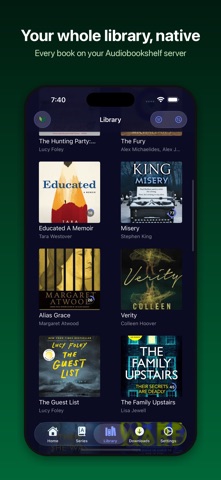
SoundLeaf is the premium iOS client for Audiobookshelf, the open-source audiobook server. Connect to your personal Audiobookshelf server and enjoy your entire audiobook collection with a beautiful, intuitive interface designed for the best listening experience. KEY FEATURES: • CarPlay support • Connect to your Audiobookshelf server quickly and securely • Browse your audiobook and podcast libraries with a clean, modern interface • Listen to your content with a powerful audio player featuring variable playback speed • Track your listening progress across all your devices • Download books for offline listening when you're away from WiFi • Smart sleep timer with auto-pause and customizable durations • Chapter navigation and position memory • Beautiful UI themes and customization options • Background playback and lock screen controls • Support for multiple libraries on your server • Optimized for both iPhone and iPad SoundLeaf is designed for audiobook enthusiasts who want a premium listening experience for their personal libraries. Connect to any Audiobookshelf server to access your content. Note: SoundLeaf requires an existing Audiobookshelf server to connect to. Learn more about setting up your own Audiobookshelf server at https://audiobookshelf.org Terms of Use (EULA): https://www.apple.com/legal/internet-services/itunes/dev/stdeula/
Latest release
What’s New
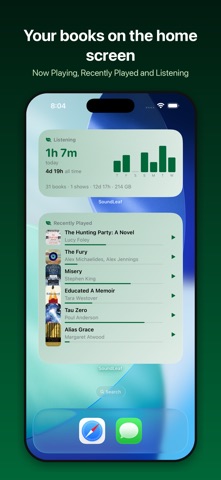
NEW • Apple Watch app. Send a book or an episode to your watch, then listen with the phone left at home. Progress finds its way back to your server on its own. • Ebook reader, free for everyone. Read a book’s epub in the app, offline. Search the text, set the font and spacing, and tap Go to Position to open the page your narrator is on. • Smoother playback. Books split across many files now play straight through the joins at any speed. Voice Boost lifts quiet or muddy narration. • Auto rewind. Playback starts a little before where you stopped, and further back after a long break. Every number is yours to set. • Downloads rebuilt. A downloaded book now plays with the server off, and closing the app mid-download no longer strands it. • Home screen widgets. Now Playing, Recently Played, and a Listening card with your streak and library totals. The sleep timer counts down on the lock screen. • Signing in. Use OpenID if your server has it, and set one address for home Wi-Fi and another for everywhere else. • Also: pick your app icon, drawn covers for books with no artwork, a bookmark button in CarPlay, and a lot less stutter. FIXED • Listening sessions not syncing to the server, which could break streaks • A crash on launch after an interrupted library update • Playback skipping ahead at file boundaries in multi-file books • Multi-file books ending one file early • End-of-chapter sleep timer not pausing at the chapter end
Audience growth
Ratings growth
Baseline captured. Growth appears after the crawler observes a changed rating count.
Momentum comes from crawler snapshots for the tracked storefront. “Viral growth signal” means unusually fast recent rating gains; it is an indicator, not download data.
Price tracking
Price intelligence
First snapshot captured. The trend line starts after the next crawler price observation.
- First observed Aug 23, 2026 · 1:05 PM Free
Screenshots