About this app
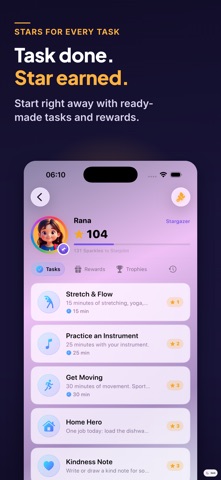
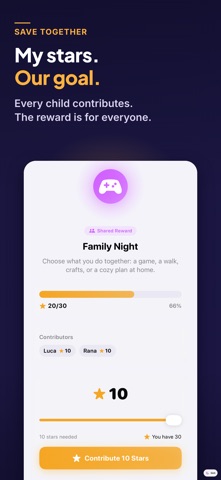
Make family tasks easier to understand, complete and celebrate. Sparkle gives children a clear place to see what needs doing and earn stars. They work toward rewards chosen together with their parents. Children complete tasks in their own area. Parents review progress, approve completed tasks and decide when rewards can be redeemed. HOW SPARKLE WORKS 1. CREATE TASKS Add your own tasks and routines or start with ready to use suggestions. Choose how many stars each task is worth. 2. CELEBRATE PROGRESS Children complete tasks and collect stars. Levels, streaks, weekly goals and badges make progress visible and create new milestones to work toward. 3. REDEEM REWARDS Choose rewards together, such as a movie night, a special activity or extra story time. You decide how many stars a reward takes and approve each redemption. MOTIVATION THAT STAYS VISIBLE • Stars can be collected and exchanged for rewards • Sparkles show progress over time • Levels, streaks, weekly goals and badges create new milestones • Frames, backgrounds and name styles can be unlocked through progress • A focus timer helps children stay engaged during activities with a set duration PARENTS STAY IN CONTROL • Completed tasks and reward requests require parent approval • Create your own tasks, star values and rewards • Protect parent controls with a four digit code • View progress and activity for each child • Adjust rewards for different ages • Use included tasks and rewards for a quick start MADE FOR A FAMILY, A GROUP OR A WHOLE CLASS Manage multiple child profiles in one app. It does not matter how many children there are: Sparkle works the same way for one child, for several children, for a group or for a whole class. Each child has a separate area for tasks, stars, rewards and progress. Shared rewards also let siblings combine their stars and work toward a larger family goal together. Sparkle includes dedicated layouts for iPhone and iPad. iPhone is for everyday use, and iPad is where Sparkle is at its best when you are keeping track of a large group. The iPad app also runs on Mac computers with Apple silicon. Home Screen widgets can show useful information at a glance. The app is available in English, German, Spanish, French and Turkish. Sparkle is designed for families that want to organize tasks more clearly, make progress visible and encourage children to take greater responsibility. PRIVATE BY DESIGN Sparkle does not require a Sparkle account or email registration. • No advertising • No tracking • No analytics tools • No sharing of personal data with advertising networks • Works locally without an internet connection • Optional synchronization through your private iCloud Sparkle does not operate its own server for your family data. When synchronization is enabled, data is stored and synchronized through the private iCloud linked to the Apple Account used on the devices. IMPORTANT INFORMATION ABOUT SYNC Synchronization currently works between devices signed in to the same Apple Account. Sharing between different Apple Accounts is not currently supported.
Latest release
What’s New
What’s New: • Sparkle is now optimized for iPad and available on Mac. • Added keyboard and trackpad support, larger widgets, and easier actions for multiple kids. • New Help & FAQ, smoother stats, and many small refinements.
Audience growth
Ratings growth
Baseline captured. Growth appears after the crawler observes a changed rating count.
Momentum comes from crawler snapshots for the tracked storefront. “Viral growth signal” means unusually fast recent rating gains; it is an indicator, not download data.
Price tracking
Price intelligence
First snapshot captured. The trend line starts after the next crawler price observation.
- First observed Aug 19, 2026 · 10:36 AM Free
Screenshots