About this app
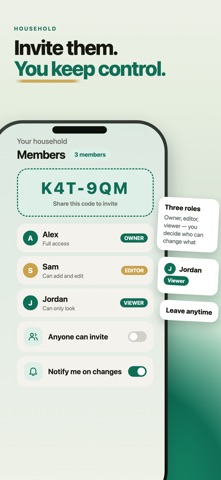
Spendy is free to use. Add expenses, set budgets, share them with your household — no trial countdown, no paywall in front of the basics. And there is no bank to connect, so there is nothing to break. No failed syncs. No re-authenticating every few weeks. No transactions that vanish, or arrive twice. You enter what matters, and it stays entered. Most budgeting apps assume one person, one wallet. Spendy is built around the household: invite your partner, your family or your roommates to one shared budget. Everyone adds, everyone sees the same picture. SHARE ONE BUDGET • Invite your partner, family or roommates to one shared household • Everyone logs income and expenses; everyone sees the same picture • Per-person breakdown — see who spent what, without the argument • Roles: Owner, Editor and read-only Viewer FREE, AND NOT THE TRIAL KIND • Income and expenses: unlimited, free, with no time limit • Budgets and your own categories: unlimited, free • Share a household of up to 3 people, free • Premium+ lifts the limits on recurring items, savings goals, investments and debts TRACK YOUR MONEY • Fast entry — log an expense in seconds • Category limits, with an alert when you go over • Recurring — rent, bills and subscriptions, with reminders • Net worth — cash, investments, savings and debt in one place • Your own categories, colours and icons YOURS, AND ONLY YOURS • Amounts are blurred by default and reveal only when you tap • No bank account linking — you decide what goes in • Multi-currency: USD, EUR, GBP and TRY PREMIUM — optional Premium removes ads and unlocks PDF export, custom themes and category colours. Premium+ adds that and lifts the free limits. Monthly or yearly, cancel anytime. Couples budgeting, family budget, roommate expenses, household finance and personal money management — in one shared app. Download Spendy and stop tracking money alone. Terms of Use (EULA): https://spendy-budget-app.web.app/terms Privacy Policy: https://spendy-budget-app.web.app/privacy
Latest release
What’s New
You can now choose whether to share anonymous usage and crash data — we ask once, inside the app, and you can change it any time in Settings › Security & Privacy. Plus stability fixes throughout.
Audience growth
Ratings growth
Baseline captured. Growth appears after the crawler observes a changed rating count.
Momentum comes from crawler snapshots for the tracked storefront. “Viral growth signal” means unusually fast recent rating gains; it is an indicator, not download data.
Price tracking
Price intelligence
First snapshot captured. The trend line starts after the next crawler price observation.
- First observed Sep 4, 2026 · 7:53 AM Free
Screenshots