About this app
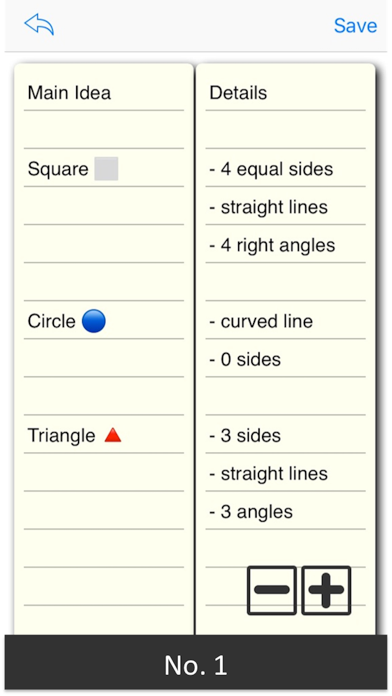
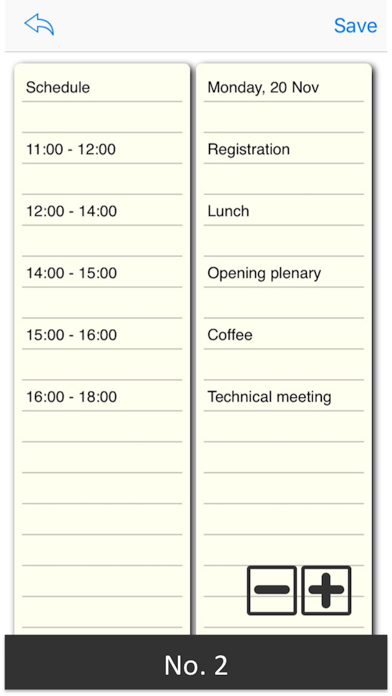
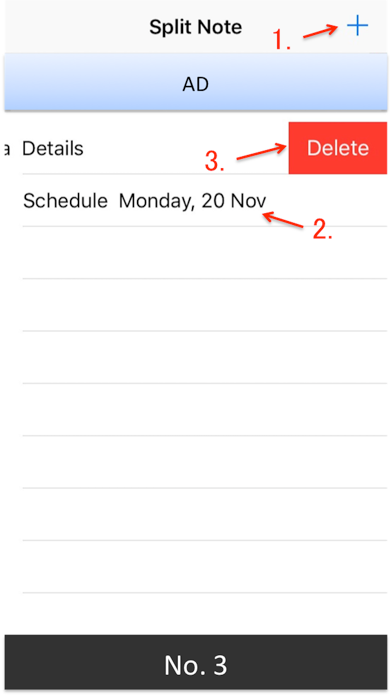
"Split Note" is a simple notebook app that you can write in 2 columns as its name suggests. Writing notes in two columns makes effective use of the screen size. In addition, since it allows you to enter and view two items at the same time in parallel, it also leads to more efficient work. # Example of use - Idea Memo Left column: fill in the theme Right column: fill in details - Schedule Left column: fill in date and time Right column: fill in the details of the schedule - Vocabulary Notebook Left column: fill in English words Right column: fill in Japanese translation - List of Baggage Contents Left column: fill in the list of your own belongings Right column: fill in the list of children's belongings - Cooking Menu Left column: fill in a weekly cooking menu Right column: fill in required foodstuff The rest is up to your ingenuity. Taking notes in two columns is said to be "Two-Column Note-Taking", and as one of effective methods to write notes in a clear and systematic manner, attention is very much in the field of education and business We are gathering. It is a simple and easy way to fill in the subject in the left column and fill the details in the right column, but it is useful for structuring the relationship of things by organizing in two stages. # Usage (See screenshots No.3,4) 1. You can create a new document by tapping the "+" icon. 2. You can edit by tapping the saved document. 3. You can delete saved documents by swiping left. 4. You can save the document by tapping the "Save" icon. 5. You can change the character size by tapping the "+" icon, "-" icon in the bottom right. The screen will not be locked while using this application, so you can concentrate on your work. By all means, please try this.
Latest release
What’s New
This update from Apple will improve the functionality of this app. No new features are included. A minor bug was fixed.
Audience growth
Ratings growth
Baseline captured. Growth appears after the crawler observes a changed rating count.
Momentum comes from crawler snapshots for the tracked storefront. “Viral growth signal” means unusually fast recent rating gains; it is an indicator, not download data.
Price tracking
Price intelligence
- First observed Aug 23, 2026 · 10:42 PM Free
Screenshots