About this app
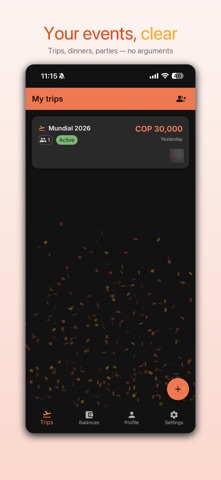
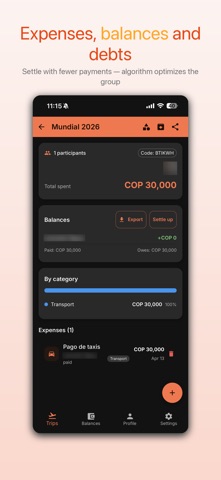
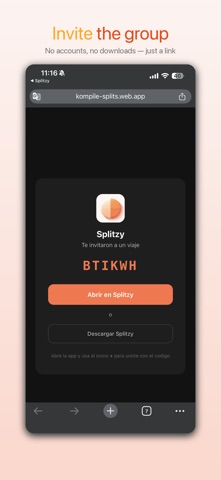
Splitzy makes splitting group expenses simple, fair, and drama-free — trips, BBQs, parties, dinners, or any event where the bill gets split. Add expenses as they happen, and Splitzy figures out who owes what — using the fewest possible transfers to settle all debts. ——— KEY FEATURES ——— • Add expenses instantly — log what was spent, who paid, and how to split it • Smart debt settlement — minimizes the number of transfers needed to settle all balances • Payment methods — everyone adds their Nequi, Daviplata, or bank account so settling is easy • Event budget — set a budget and track spending progress in real time • Archive events — keep old events tidy without losing history • Receipt photos — attach a photo of the receipt to any expense • Custom categories — organize expenses your way • Invite friends — share a link or QR code to join an event instantly • Dark mode — fully supported • Works in Spanish and English ——— SPLITZY PRO — ONE-TIME PAYMENT PER EVENT ——— Create as many events as you want, for free. When an event needs more, unlock it once and it stays unlocked for EVERY participant, forever. Anyone in the group can unlock it — it doesn't have to be whoever created it — and if that person later leaves the event, the unlock stays. Free, with no event limit: • Unlimited events, up to 4 participants each • Expenses, balances and smart settlement • Shared payment methods and notifications Once an event is unlocked: • Unlimited participants in that event • Export to PDF and Excel • Spending charts by category and person • Multi-currency support • Receipt photo attachments • Budget alerts via notification The unlock is a one-time payment per event. It is NOT a subscription: nothing renews and there is nothing to cancel. Terms of Use: https://splitzy.kompile.co/terms Privacy Policy: https://splitzy.kompile.co/privacy
Latest release
What’s New
• Fixed: on a trip with premium active, attaching a receipt and creating custom categories still asked you to pay. • Attaching a photo on Android now lets you pick camera or gallery from a menu that matches the app's design, instead of the system file browser. • Fixed: that menu showed up behind the dialog that opened it and couldn't be tapped.
Audience growth
Ratings growth
Baseline captured. Growth appears after the crawler observes a changed rating count.
Momentum comes from crawler snapshots for the tracked storefront. “Viral growth signal” means unusually fast recent rating gains; it is an indicator, not download data.
Price tracking
Price intelligence
First snapshot captured. The trend line starts after the next crawler price observation.
- First observed Sep 7, 2026 · 11:03 AM Free
Screenshots