About this app
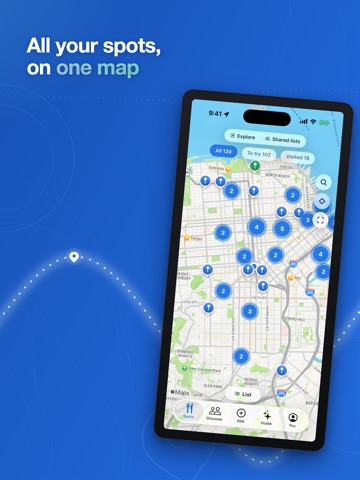
You've saved a hundred food videos. Can you find a single one of them? Everyone saves food videos — a Reel of a pasta flight, a TikTok of a smash burger, a friend's post about a rooftop bar — and then never sees them again. They rot in a bookmarks folder with no name, no address, and no way to remember why you saved them. Spotguide fixes that: send us the post, and the actual restaurant appears as a pin on your personal map. When you're hungry, you don't scroll your camera roll — you open your map, or just ask. SAVE A SPOT IN SECONDS • DM it. Forward any Reel, post, or story to @spotguideapp on Instagram, exactly like you'd share it with a friend. Seconds later you get a "Saved" reply with the restaurant's name. You never leave Instagram. • Paste a link. Instagram, TikTok, and Facebook links work right in the Add tab — saves run in the background while you keep browsing. • Share from anywhere. "Save to Spotguide" lives in your iOS share sheet. • Upload a screenshot. Spotguide reads the location tag, the @mentions — even the sign above the door. IT ACTUALLY WATCHES THE VIDEO AI reads the caption, listens to the audio, and reads the text on screen — the menu board, the storefront sign — then matches the real place on the map. A "5 best taco spots" roundup? All five pins land from one share. Shaky match? Spotguide asks you instead of guessing wrong. A MAP THAT REMEMBERS WHY Every pin keeps the story: the posts you saved it from, what to order, the vibe, hours, menus with prices — plus your own private notes. One tap for directions or a reservation. ASK YOUR MAP ANYTHING Guide is the assistant built into your map. Ask in plain English — "date night near me," "is Joe's open right now," "how much is the cheese pizza" — and it answers from the places you actually saved. No generic top-10 lists. It knows your map. SHARE YOUR TASTE Group spots into lists — "Tokyo trip," "Date nights," "Best pizza" — and share any of them with a link. Friends see the list beautifully laid out, no account needed. Follow a list and it stays live: they add a spot, you see it appear. Build lists together with a co-editor, or share one perfect spot — it unfurls in iMessage as the place itself, photo and all. FIND PEOPLE WORTH FOLLOWING The new Discover tab is a feed of spots picked for you, popular lists, and people to follow — friends and food creators whose taste you trust. Your account stays completely private until you choose otherwise, and your personal notes never travel. Ever. RECOMMENDATIONS THAT GET YOUR TASTE Explore looks beyond your saves: places matched to what you actually love — the birria, the hand-pulled noodles, the cozy wine bars — not just what's trending. Visited somewhere? Answer one private question (smile or frown?) and Spotguide learns. Nobody else ever sees your ratings. NEVER WALK PAST A SAVED SPOT AGAIN Turn on nearby alerts and Spotguide taps you on the shoulder when you're near a place on your list. Polite by default, battery-friendly always. Your map syncs with the web app at spotguide.app. Sign in with Apple, Google, email — or just DM us a code from Instagram. Stop scrolling your camera roll to find dinner. Open your map.
Latest release
What’s New
A NEW LOOK The whole app moved to Spotguide blue, with a calmer Spots page and proper sorting — newest, closest, A to Z. Your pick is remembered. DISCOVER A new tab for finding people, lists, and spots: follow friends and food creators, browse popular lists, and see spots picked for your taste. Public profiles are strictly opt-in — everything stays private until you flip the switch. SHARED LISTS Share any list with a link that looks great in iMessage and WhatsApp. Followed lists stay live — when the owner adds a spot, you see it. Invite a co-editor to build a list together, or share a single spot. Shared links now open straight in the app. EXPLORE, TUNED TO YOU Recommendations now read the character of what you save — the dishes, the vibe — not just what's popular. Pick your style: Balanced, My taste, or Popular. RATE IT, PRIVATELY Mark a spot visited and answer one question: smile or frown? Ratings are never shown to anyone — they only teach your recommendations. Loved it? Spotguide instantly suggests a few places like it. ALSO • Talk to Guide: tap the mic, ask out loud, and hear the answer — a hands-free conversation about where to eat • Sign in with Google • Smarter place pages: what to order, the vibe, and know-before-you-go, distilled from the actual videos • Real restaurant photos on cards and place pages • Dozens of fixes and speed-ups
Audience growth
Ratings growth
Baseline captured. Growth appears after the crawler observes a changed rating count.
Momentum comes from crawler snapshots for the tracked storefront. “Viral growth signal” means unusually fast recent rating gains; it is an indicator, not download data.
Price tracking
Price intelligence
First snapshot captured. The trend line starts after the next crawler price observation.
- First observed Aug 19, 2026 · 5:55 PM Free
Screenshots