About this app
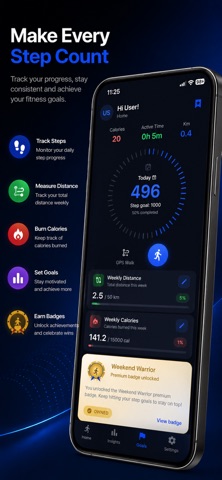
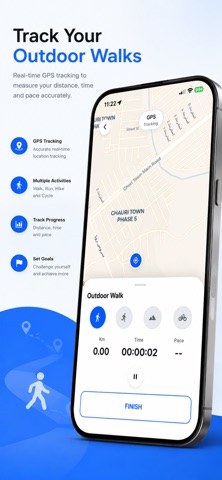
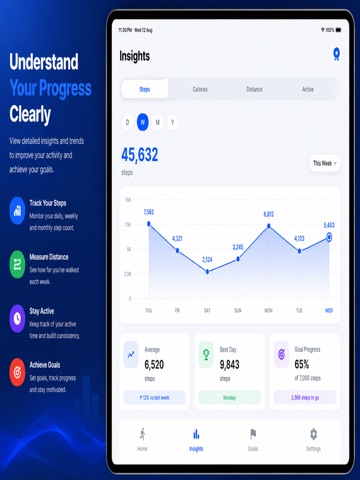
Steps - Pedometer & Counter is the simple, accurate way to track your daily activity — no wristband, no subscription, no hassle. Whether you're walking to lose weight, training for a 5K, or just trying to hit a daily steps goal, this app quietly counts every step in the background using your iPhone's built-in motion tracker — so you never have to open the app to stay on track. WHY YOU'LL LOVE IT • Automatic Step Tracking Steps are counted continuously in the background — just carry your phone as normal. No need to start or stop anything. • Daily Steps Goal Set a personal daily goal and watch your progress fill in real time. Small daily wins add up to real results. • Distance & Calories Burned See exactly how far you've walked (in miles or kilometers) and how many calories you've burned — updated live as you move. • Simple Activity Log A clean daily and weekly activity log shows your walking history at a glance, so you can spot trends and stay motivated. • Lightweight & Accurate Built to be fast, accurate, and battery-friendly. No bulky permissions, no wristband required — just your iPhone. • Home Screen Widget Add the widget to your home screen for a quick glance at your steps and progress without even opening the app. • Weight Loss & Fitness Tracking Whether your goal is weight loss, general fitness, or simply moving more each day, this app gives you the numbers you need to stay accountable. PERFECT FOR - Daily walkers looking for a simple, no-fuss step counter - Anyone wanting to move more and build a healthier daily habit - People who don't want to wear a fitness band or watch - Users who want accurate steps, distance, and calorie tracking in one lightweight app HOW IT WORKS Steps - Pedometer & Counter uses your iPhone's built-in motion coprocessor — the same low-power hardware Apple Health relies on — to detect steps automatically. There's no GPS drain, no constant location tracking, and no need to carry a separate device. Just keep your phone with you as usual, and your daily step count, distance, and calories burned update quietly in the background. FREQUENTLY ASKED QUESTIONS Will this drain my battery? No. Step counting uses Apple's dedicated low-power motion chip, not GPS or constant background refresh, so the impact on battery life is minimal — similar to how Apple Health tracks steps. Do I need to keep the app open? No. Once installed, your steps, distance, and calories are tracked automatically in the background. Open the app anytime to check your progress, or glance at the home screen widget. Do I need an Apple Watch or fitness band? No. This app is designed to work entirely from your iPhone — no wearable required. If you prefer tracking steps without a wristband, this app is built exactly for that. Is my data private? Yes. Your activity data is stored on your device. There's no account creation, no email sign-up, and no unnecessary data collection. Can I set my own daily goal? Yes. You choose your own daily steps goal based on what works for you — whether that's a light daily walk or a more ambitious target. Does it track distance in miles or kilometers? Yes. Distance updates automatically alongside your step count, so you always know how far you've walked. WHY TRACKING YOUR STEPS MATTERS Walking is one of the simplest, most accessible forms of daily movement. A consistent walking habit can support weight management, cardiovascular health, and mental wellbeing — and the easiest way to build a habit is to make progress visible. Seeing your daily steps, distance, and calories burned in one place turns "I should walk more" into a clear, trackable daily goal you can actually hit. Download Steps - Pedometer & Counter today and start turning every walk into visible progress toward your daily goal. Terms of Use (EULA): https://www.apple.com/legal/internet-services/itunes/dev/stdeula/ Privacy Policy: https://appstoreapps2025.blogspot.com/p/privacy-policy-for-steps-pedometer.html
Latest release
What’s New
Home Screen Widget See today's steps and goal progress without opening the app. Add it from the home screen, or as a circular widget on your Lock Screen (iOS 16+). Steps Premium Remove ads and unlock everything with a single one-time purchase. No subscription, no recurring charges — buy once and it's yours. More Reliable Tracking Step and Apple Health syncing is steadier and noticeably lighter on battery. Also in This Update • Discover our other apps from Settings • Clearer messages if a purchase can't be completed • Rate the app directly from Settings • Various bug fixes and performance improvements
Audience growth
Ratings growth
Baseline captured. Growth appears after the crawler observes a changed rating count.
Momentum comes from crawler snapshots for the tracked storefront. “Viral growth signal” means unusually fast recent rating gains; it is an indicator, not download data.
Price tracking
Price intelligence
First snapshot captured. The trend line starts after the next crawler price observation.
- First observed Sep 23, 2026 · 10:21 PM Free
Screenshots