About this app
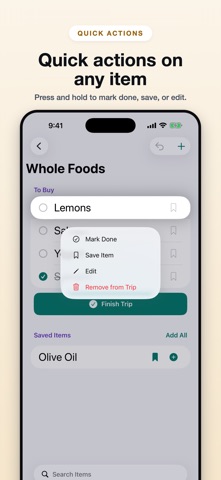
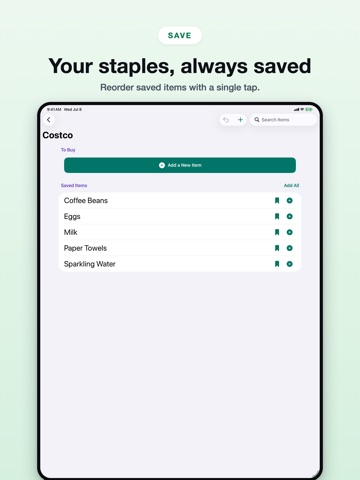
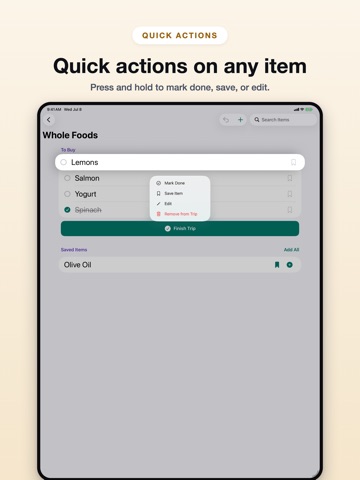
Store Buddy is a simple shopping list organized around the stores you actually visit. Create a list for each store, save the items you buy over and over, and keep each shopping trip clean. Add saved items back to a trip one at a time or all at once, mark items done while you shop, then finish the trip without losing the saved staples you will need next time. Store Buddy is built for repeat shopping, not one giant list. Keep Costco separate from the grocery store. Keep pharmacy items separate from errands. Use Siri, App Shortcuts, Home Screen quick actions, and widgets to add items to stores without digging through the app. Search across a store's current trip and saved items, undo recent changes, and sync your lists through your Apple account. Features: - Store-specific shopping lists - Saved recurring items for each store - Siri and App Shortcuts for adding items by store - Home Screen widgets for recent stores - Configurable small widget for a pinned store - Home Screen quick actions for recent stores - Add one saved item or add every saved item at once - Press and hold any item for quick actions: mark done, save, edit, or remove - Mark trip items done and finish the trip when you are ready - Finished trips clear bought items while preserving saved staples - To Buy and Saved Items sections stay in place, even when a trip is empty - Search stores, current trip items, and saved items - Undo recent changes - iCloud sync through your Apple account - Dynamic Type support - Light and dark mode support - iPhone, iPad, and Mac support
Latest release
What’s New
Store Buddy 2.2.5 keeps shopping lists intact when two devices edit at the same time — without bringing back things you already finished or deleted. - Finish a trip, swipe an item off this trip, or unsave a staple and it stays gone on your other devices. - Saved staples stay in the Saved list until you add them to a trip. They do not jump onto the next trip by themselves. - New items added on two devices at once are still kept on both sides.
Audience growth
Ratings growth
Baseline captured. Growth appears after the crawler observes a changed rating count.
Momentum comes from crawler snapshots for the tracked storefront. “Viral growth signal” means unusually fast recent rating gains; it is an indicator, not download data.
Price tracking
Price intelligence
First snapshot captured. The trend line starts after the next crawler price observation.
- First observed Aug 27, 2026 · 12:55 PM Free
Screenshots